
記事一覧へ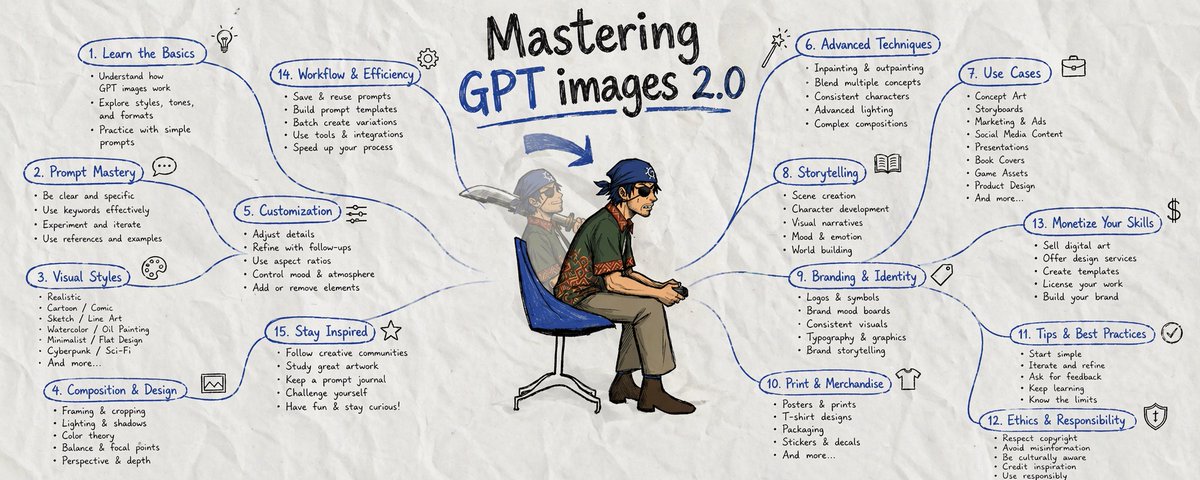
## GPT Images 2.0完全マスターガイド
AIオタク、デザインオタク、プロンプトオタク、GPTイメージオタクのアドバイスをすべて1つのマスターガイドにまとめた。GPT IMAGES 2.0で初心者からマスターへ。
ストーリーボード。キャラクターシート。製品モックアップ。SNSキャンペーン。UIコンセプト。インフォグラフィック。その他もろもろ。
GPT images 2.0を使えば、これらすべてが可能だ。
初心者は、より良いMidjourney的な感覚で扱う——「かっこいいコミックキャラクターを作って」
プロはワークフローを構築し、再利用可能なアンカーを作成する。
GPT images 2.0が実際に力を発揮する場所を見ていこう:
---
### 1:ビジュアルストーリーテリング
OpenAI自身の例が、キャラクター継続性を持つ漫画シーケンス、ストーリーボードの分解、適切なパネルのペーシングを持つコミックストリップを示している。
これは従来のワークフローを打ち砕く:
- キャラクター継続性を持つアニメストーリーボードページ
- コンバートするSNSコンテンツカルーセル
- ショットバイショットのビデオ分解
- 読みやすいペーシングのコミックストリップ
> @DtheW1995(Dennisthe Menace)
> Apr 22:「より速く、より良く、より簡単になっている。OpenAI ChatGPT Image 2.0がストーリーボードを作成:
> 「3x3ストーリーボードグリッドを作成:グラジエーターズアリーナでのアクションファイトシーン」
> …そしてSeedance 2.0でビデオを作成:
> 「セリフなし、音楽のみでストーリーを作成」」
プロはディレクターのようにスクリプトを書く。
---
### 2:キャラクターシステム
ブレークスルー:世代間でドリフトしない再利用可能なキャラクターアンカー。
実際の応用:
- YouTubeチャンネルのマスコット
- キャンペーン全体でスケールする製品キャラクター
- ゲームキャラクター開発シート
- コミック主人公のリファレンス
自分のキャラクターを作成し(または既存のものを提供し)、次のようにさまざまなシーンで活用できる:
---
### 3:キャンペーン
OpenAIはライブデモで韓国のホスピタリティパンフレット、エディトリアルポスター、タイポグラフィコントロールを持つグラフィックスプレッドを示した。
- 製品ローンチキャンペーン
- ブランドアセットライブラリ
- SNSキャンペーンビジュアル
- プレゼンテーション素材
90分でリブランドコンセプト全体を生成できる。ポスターバリエーション12点、SNSアセット8点、パッケージングコンセプト3点。
従来のコスト:£8,000 GPT images 2.0のコスト:そうではない...
> @rom1trs(Romain Torres)
> Apr 22:「1枚の画像を20本のバイラル広告に変換するGPT 2ワークフローを構築した。GPT image 2は最も強力な画像モデルだ。Arcadsワークフローで広告キャンペーンをスケールできる。」
---
### 4:機能する教育コンテンツ
学術ポスター、証拠の可視化、プロセス図。クックブックはこれらをインストラクショナルデザインのブリーフとして扱うことを推奨している。
出力例:
- ステップバイステップの解説
- ラベル付きプロセスチャート
- 教室用教材
- ビジュアル指示ガイド
---
### 5:製品開発
パッケージングコンセプト、バーチャルトライオン、製品写真、コレクタブルデザイン。
アプローチの違い:
- アマチュア:「製品写真を作って」
- プロフェッショナル:「ラグジュアリースタイリング、スタジオ照明、白背景、製品を3/4アングルに配置したプレミアム製品ヒーローショットを作成」
---
## GPT images 2.0のプロンプトの作り方
### 1:ユニバーサルプロンプト
```markdown
Goal: [具体的な成果物タイプ]
Deliverable: [ポスター/ストーリーボード/キャラクターシート/モックアップ]
Scene: [環境とコンテキスト]
Subject: [主要なフォーカス要素]
Style: [フォトリアリスティック/エディトリアル/アニメ/フラットデザイン]
Composition: [フレーミング/レイアウト/焦点]
Text: [引用符内の正確な文言]
Constraints: [固定するもの/変えるもの/禁止するもの]
```
このテンプレートは明確性を強制する。
---
### 2:ストーリーボードマスタリープロンプト
```markdown
Goal: 6パネルストーリーボードページを作成
Story beats:
Panel 1: [オープニングショット - ワイドエスタブリッシング]
Panel 2: [キャラクターリアクション - ミディアムショット]
Panel 3: [アクションまたは発見 - ダイナミックアングル]
Panel 4: [エモーショナルクローズアップ]
Panel 5: [転換点 - ドラマチックな瞬間]
Panel 6: [解決 - 最終リビール]
Character continuity: 全体を通じて同じ顔、髪、衣装、プロポーション
Style: プロフェッショナルなパネルレイアウトのクリーンなアニメストーリーボード
Constraints: 1パネルに1つのアクション、最小限のセリフ、背景の混雑なし
```
結果:実際に流れるストーリーテリング。
---
### 3:キャラクターシステム
```markdown
Goal: マスターキャラクターリファレンスシートを作成
Character: [詳細な身体的説明 - 身長、体格、特徴的な外見]
Include: 正面ビュー、3/4ビュー、サイドビュー、表情バリエーション、重要なポーズ
Style: [アニメ/リアリスティック/カートゥーン - 一貫性レベルを指定]
Layout: 明確なラベルを持つプロフェッショナルなリファレンスシート
Constraints: 一貫したプロポーション、衣装バリエーションなし、クリーンな背景
```
(キャラクターをアップロードして)フォローアップシーンでは:マスターシートを参照。ポーズ/設定/照明だけを変える。
---
### 4:キャンペーン
```markdown
Goal: [ローンチポスター/SNSアセット/製品モックアップ]を作成
Audience: [具体的なターゲット層]
Message: [核心的な価値提案]
Mood: [ラグジュアリー/エネルギッシュ/信頼感/革新的]
Text (EXACT): "[ヘッドライン]" と "[サブヘッディング]"
Typography: [モダンサンセリフ/エレガントセリフ/ボールドディスプレイ - 階層を指定]
Constraints: ブランドカラーのみ、余分なテキストなし、強いビジュアル階層
```
重要な詳細:正確なコピーを引用符で囲む。逐語的なレンダリングを要求する。
---
### 5:上級戦術
#### 継続性システム
キャラクター一貫性のためのコミュニティテスト済みワークフロー:
1. マスター説明を作成——外見のみ、シーンの詳細なし
2. キャラクターに名前をつける——参照用に「Alex」や「Maya」など
3. コアの詳細を再利用——フォローアップで重要な外見要素を繰り返す
4. アイデンティティとアクションを分離——ポーズ/設定を変え、キャラクターを保持する
マスター説明の例:「Maya、28歳、アスレチック体型、肩の長さのブルーハイライト入りダークヘア、特徴的なグリーンの瞳、左眉上の小さな傷、通常はフィットしたブラックジャケット着用」
フォローアップの使用法:「Maya [マスター説明より] がカフェのテーブルに座り、ラップトップを開いた、朝の照明、3/4ビュー」
#### 編集プロトコル
常に指定する:
```
Change only: [特定の要素]
Preserve: [それ以外のすべて - 明示的にリスト]
Keep same: [照明/ポーズ/背景/色]
```
例:「ラップトップの画面を財務チャートを表示するように変更するだけ。Mayaのポーズ、表情、照明、背景、服装を保持。他のすべてを同一に保つ。」
#### 品質スケーリング戦略
- 低品質:ドラフト、探索、コンセプト開発
- 中品質:SNSアセット、プレゼンテーション、社内利用
- 高品質:印刷素材、最終成果物、クライアント作業
---
## よくある失敗と即効修正
**問題**:キャラクターが画像間でドリフトする
**修正**:キャラクターアンカーシステム。マスター説明。コアの詳細を繰り返す。
**問題**:テキストは表示されるが正確でない
**修正**:テキストを短くし、引用符を使い、タイポグラフィを指定し、品質設定を上げる。
**問題**:編集が変えすぎる
**修正**:「Xだけを変える」プロトコル。同一に保つべきものをリストアップする。
**問題**:出力がジェネリックに見える
**修正**:具体的な素材、照明、フレーミング。「かっこよく見せて」は避ける。
**問題**:レイアウトが混雑している
**修正**:デザインブリーフのように書く。階層、余白、タイポグラフィのルールを指定する。
---
## 勝つためのマインドセット
初心者が尋ねる:「どんなプロンプトを書くべきか?」
プロが尋ねる:「必要な成果物を構築するワークフローは何か?」
違いはシステム思考だ。
プロはGPT images 2.0を次のように使う:
- ストーリーボード製作エンジン
- キャラクター開発ツール
- キャンペーンアセットジェネレーター
- ローカライゼーション乗数
- コンセプト開発アクセラレーター
より良いプロンプトを書くのではない。より良いシステムを構築する。
---
## 最も重要なこと
「画像ジェネレーター」という考えをやめる。
「ビジュアルプロダクションシステム」という考えを始める。
本当の力:アイデアを成果物アセットに変えること。ストーリーを語るストーリーボード。スケールするキャラクターシート。コンバートするキャンペーン。売れるモックアップ。機能するコンテンツ。
クリエイティブなスロットマシンではなく、明確なブリーフを持つプロフェッショナルなコラボレーターとして扱う。
**次のアクション**:成果物タイプを1つ選ぶ。ストーリーボード、キャラクターシート、またはキャンペーンアセット。
まずそのワークフローをマスターする。何を試すか教えてほしい!
GPT Images 2.0AI image generationprompt engineeringai-design
GPT Images 2.0完全マスターガイド——初心者からプロまでのプロンプト設計と活用術
31029
原文を表示 / Show original
hoeem
@hooeem
I want to master GPT images 2.0.
11
32
310
62K
I have combined every AI nerd, designer nerd, prompt nerd, and GPT image nerds advice into one master guide on GPT IMAGES 2.0 to take you from a beginner to a master.
storyboards. character sheets. product mockups. social campaigns. ui concepts. infographics. more.
it is ALL possible using gpt images 2.0.
beginners will treat this like a better midjourney "make me a cool comic character"
the pros will build workflows and create reusable anchors.
let me show you where gpt images 2.0 actually dominates at:
1: visual storytelling
openai's own examples show manga sequences, storyboard breakdowns, comic strips with proper panel pacing.
this obliterates traditional workflows:
anime storyboard pages with character continuity social content carousels that convert shot-by-shot video breakdowns comic strips with readable pacing
DennistheMenace
@DtheW1995
·
Apr 22
It’s getting better, faster and easier. Openai chatgpt Image 2.0 makes the storyboard:
„Create a 3x3 storyboard Grid: Action Fight Scene in Gladiators Arena”
..then have the video created with Seedance 2.0:
„Create the story, only music, without dialogue“
0:13
Made with AI
3
2
9
5K
pros script it like directors.
2: character systems
the breakthrough: reusable character anchors that don't drift between generations.
real applications:
youtube channel mascots product characters that scale across campaigns
game character development sheets comic protagonist references
you can make your character (or give it one you have) and utilise it in different scenes like this:
3: campaigns
openai in their live demo showed korean hospitality brochures, editorial posters, graphic spreads with typography control.
product launch campaigns brand asset libraries social campaign visuals presentation materials
you could generate an entire rebrand concept in 90 minutes. 12 poster variations, 8 social assets, 3 packaging concepts.
traditional cost: £8,000 gpt images 2.0 cost: NOT THAT...
look at this:
Romain Torres
@rom1trs
·
Apr 22
I built a GPT 2 workflow that turns one image into 20 viral ads
GPT image 2 is the most powerful image model out there
And you can use it to scale your ads campaign with Arcads workflow
Comment Arcads to get the workflow now
660
56
766
75K
4: educational content that works
academic posters, proof visualisations, process diagrams. the cookbook recommends treating these like instructional design briefs.
output examples:
step-by-step explainers labeled process charts classroom teaching materials visual instruction guides
5: product development
packaging concepts, virtual try-ons, product photography, collectible designs.
approach difference:
amateur: "make a product photo" professional: "create premium product hero shot with luxury styling, studio lighting, white background, product positioned at 3/4 angle"
ANYWAY... those were some examples, but how should you prompt gpt images 2.0?
well., let's do that.
1: universal prompt
markdown
Goal: [specific deliverable type]
Deliverable: [poster/storyboard/character sheet/mockup]
Scene: [environment and context]
Subject: [main focus elements]
Style: [photorealistic/editorial/anime/flat design]
Composition: [framing/layout/focal points]
Text: [exact words in quotes]
Constraints: [what stays fixed/what changes/what's forbidden]
this template forces clarity.
2: storyboard mastery prompt
markdown
Goal: Create 6-panel storyboard page
Story beats:
Panel 1: [opening shot - wide establishing]
Panel 2: [character reaction - medium shot]
Panel 3: [action or discovery - dynamic angle]
Panel 4: [emotional close-up]
Panel 5: [turning point - dramatic moment]
Panel 6: [resolution - final reveal]
Character continuity: Same face, hair, outfit, proportions throughout
Style: Clean anime storyboard with professional panel layout
Constraints: One clear action per panel, minimal dialogue, no background clutter
result: storytelling that actually flows.
3: character system
markdown
Goal: Create master character reference sheet
Character: [detailed physical description - height, build, distinctive features]
Include: Front view, 3/4 view, side view, expression variations, key poses
Style: [anime/realistic/cartoon - specify consistency level]
Layout: Professional reference sheet with clear labels
Constraints: Consistent proportions, no costume variations, clean background
(just upload him), and for follow-up scenes: reference the master sheet. change only pose/setting/lighting.
4: campaigns
markdown
Goal: Create [launch poster/social asset/product mockup]
Audience: [specific target demographic]
Message: [core value proposition]
Mood: [luxury/energetic/trustworthy/innovative]
Text (EXACT): "[headline]" and "[subheading]"
Typography: [modern sans-serif/elegant serif/bold display - specify hierarchy]
Constraints: Brand colours only, no extra text, strong visual hierarchy
critical detail: put exact copy in quotes. demand verbatim rendering.
5: advanced tactics
the continuity system
community-tested workflow for character consistency:
create master description - appearance only, no scene details
name your character - "alex" or "maya" for reference
reuse core details - repeat key appearance elements in follow-ups
separate identity from action - change pose/setting, preserve character
example master description: "maya, 28, athletic build, shoulder-length dark hair with blue highlights, distinctive green eyes, small scar above left eyebrow, typically wears fitted black jacket"
follow-up usage: "maya [from master description] sitting at cafe table, laptop open, morning lighting, 3/4 view"
the editing protocol
always specify:
change only: [specific element]
preserve: [everything else - list explicitly]
keep same: [lighting/pose/background/colours]
example: "change only the laptop screen to show financial charts. preserve maya's pose, facial expression, lighting, background, clothing. keep everything else identical."
quality scaling strategy
low quality: drafts, exploration, concept development medium quality: social media assets, presentations, internal usehigh quality: print materials, final deliverables, client work.
NOW THEN... what about common failures? well here's there instant fixes:
problem: character drifts between images
fix: character anchor system. master description. repeat core details.
problem: text appears but isn't exact
fix: shorten text, use quotes, specify typography, increase quality setting.
problem: edits change too much
fix: "change only X" protocol. list what must stay identical.
problem: output looks generic
fix: specific materials, lighting, framing. avoid "make it look good."
problem: layouts feel cluttered
fix: write like design brief. specify hierarchy, spacing, typography rules.
the mindset that wins
beginners ask: "what prompt should i write?"
professionals ask: "what workflow builds the deliverable i need?"
the difference is systems thinking.
pros use gpt images 2.0 as:
storyboard production engine character development tool campaign asset generator
localisation multiplier concept development accelerator
they don't prompt better. they build better systems.
here's what matters most
stop thinking "image generator."
start thinking "visual production system."
the real power: turning ideas into deliverable assets. storyboards that tell stories. character sheets that scale. campaigns that convert. mockups that sell. content that works.
treat it like a professional collaborator with clear briefs, not a creative slot machine.
your next move: pick one deliverable type. storyboards, character sheets, or campaign assets.
master that workflow first. let me know what you're going to try first!
Want to publish your own Article?
Upgrade to Premium
5:49 AM · Apr 24, 2026
·
62.5K
Views
11
32
310
728
Read 11 replies