
記事一覧へ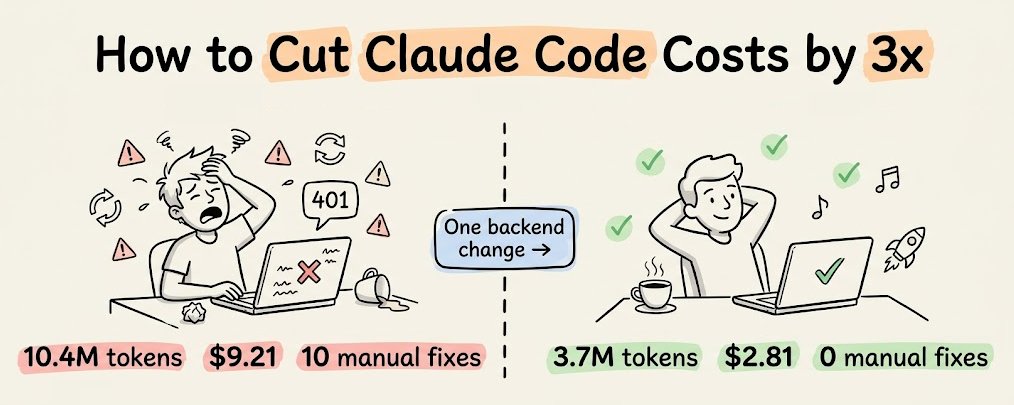
## Claude Codeのコストを3倍削減する方法(Karpathyのコンテキストエンジニアリング原則を活用)
あるオープンソースツールがCLAUDE.md・プロンプト・モデルを一切変更せずにClaude Codeのセッションコストをどのように3倍削減するか、完全な解説(セットアップガイドと有効な理由の説明付き)。
### MCPMark V2ベンチマークで判明した逆説的な事実
ClaudeがSonnet 4.5からSonnet 4.6に移行した際、SupabaseのMCPサーバー経由のバックエンドトークン使用量は増加していた——21のデータベースタスク全体で11.6Mトークンから17.9Mトークンへと。
モデルは賢くなったのに、バックエンドのトークン使用量は実際には増えた。
理由は微妙なところにある。モデルの問題ではない。バックエンドがエージェントに情報をどのように提供するか、の問題だ。コンテキストが不完全なとき、より有能なモデルは欠落を単に無視するわけではない。欠落について推論するためにより多くのトークンを消費し、より多くの探索クエリを実行し、より頻繁にリトライする。つまり、コンテキストの欠落はより良いモデルになっても消えない——より高くつくだけだ。
なぜバックエンドがエージェントのトークンを浪費するのか、代替アーキテクチャはどのようなものか、そして実際のプロジェクトでのコスト差を見ていこう。
---
## なぜSupabaseのMCPサーバーはトークンを無駄にするのか
Supabaseは優れたバックエンドだ。しかしAIエージェントによる操作を想定して設計されておらず、後から追加されたMCPサーバーもその制限を引き継いでいる。
トークン膨張を引き起こす3つの具体的なメカニズムがある。
### 1) ドキュメント取得が全情報を返す
CC(Claude Code)がSupabaseを通じてGoogle OAuthをセットアップする必要があるとき、`search_docs` MCPツールを呼び出す。Supabaseの実装は毎回の呼び出しで完全なGraphQLスキーマメタデータを返す——エージェントが実際に必要なトークン量の5〜10倍だ。
エージェントがOAuthセットアップ手順を求めても、email/password・magic links・電話認証・SAML・SSOに関するセクションを含む認証ドキュメント全体が返ってくる。
これはデータベースクエリ・ストレージ設定・Edge Functionデプロイなど、あらゆる`search_docs`の呼び出しで発生する。各呼び出しはそのドメイン全体のフルメタデータを投入する。エージェントが認証・データベース・ストレージ・Functionをセットアップするセッション全体で、ドキュメントのオーバーヘッドだけで数千の無駄なトークンが発生する。
### 2) バックエンドの状態が見えない
人間の開発者としてSupabaseを使う場合、ダッシュボードを開けば——有効な認証プロバイダー・テーブル・RLSポリシー・ストレージバケットの設定・デプロイ済みEdge Functionなど——すべてが一目でわかる。
エージェントにはダッシュボードが見えない。
SupabaseのMCPサーバーは`list_tables`や`execute_sql`などの個別ツールで一部の状態を公開しているが、「今のバックエンド全体の状態は?」と聞いて構造化された一つのレスポンスを得る方法がない。そのためエージェントは複数の呼び出しをかき集めて情報をつなぎ合わせる必要があり、各呼び出しは部分的なビューしか返さない。しかも一部の情報(どの認証プロバイダーが設定されているかなど)はMCP経由では全く取得できない。
この断片的な探索プロセスがトークンを消費し、情報が不完全な形で返ったり、解釈するためにさらなるクエリが必要な形式で返ったりするため、エージェントは何度も試みる必要が生じる。
### 3) 構造化されたエラーコンテキストがない
何かがうまくいかないとき(エージェントが推測しているのだからそれは起こる)、Supabaseは生のエラーメッセージを返す。RLSの拒否による403かもしれないし、誤設定のEdge Functionによる500かもしれない。
人間の開発者なら、それを見て、Supabaseダッシュボードを確認し、ログと照合して問題を修正するだろう。エージェントにはそのパスがない。エラーメッセージを受け取り、何が原因かを推論し、修正を試みる。修正が間違っていればリトライする。リトライのたびに会話履歴全体が再送され、トークンコストが積み重なる。
これら3つのメカニズム(ドキュメントのオーバーヘッド・状態探索・エラーリトライループ)は急速に複合する。Sonnet 4.6のようにより深く推論するモデルは、各探索ステップをより徹底的に、そしてより高コストにする。これがSonnet 4.5から4.6でトークンの差が広がった理由であり、新しいモデルがリリースされるたびにその差はさらに広がる可能性が高い。
---
## 「バックエンドのコンテキストエンジニアリング」とはどうあるべきか
解決策は別のモデルへの切り替えではない。エージェントが探索や推測をしなくて済むよう、構造化されたバックエンドコンテキストを与えることだ。
これがKarpathyの言う「コンテキストエンジニアリング」の意味だ:「次のステップに必要なまさに正しい情報でコンテキストウィンドウを埋めるという繊細な芸術と科学」。彼はツールと状態もそのコンテキストの一部として明示的に含めている。ほとんどの人はこのアイデアをプロンプトとRAG検索に適用している。
しかしバックエンドもコンテキストウィンドウの一部であり、今のところ誰も最適化していない部分だ。
これが実際にどのようなものかを見るために、InsForge(8kスター、オープンソース)がこのアプローチを実装している。Supabaseと同じプリミティブ(pgvector付きPostgres・認証・ストレージ・Edge Function・リアルタイム)を提供しながら、エージェントが効率的に消費できるよう情報レイヤーを構造化している。
重要なアーキテクチャの違いは、Claude Codeへのコンテキスト提供方法にある。3つのレイヤーが連携して機能する:
- **Skills**:静的知識のため
- **CLI**:バックエンド操作の直接実行のため
- **MCP**:ライブ状態検査のため
各レイヤーは異なる問題を解決し、異なる理由でトークンを削減する。
### 1) Skills:ラウンドトリップゼロの静的知識
知識提供の主要アプローチはSkillsだ。セッション開始時にエージェントのコンテキストに直接ロードされるため、すべてのバックエンド操作のSDKパターン・コード例・エッジケースがツール呼び出し不要で利用できる。
Skillsはプログレッシブディスクロージャーも採用している——最初にメタデータ(名前・説明、1スキルあたり約70〜150トークン)だけがロードされる。フルのスキルコンテンツは、エージェントが現在のタスクに一致すると判断した場合のみロードされる。これにより、MCPのオールオアナッシングのスキーマロードでは不可能な、コンテキスト膨張なしに100以上のスキルをインストールできる。
4つのスキルが全スタックをカバーし、それぞれ特定のドメインにスコープされている:
- `insforge`:バックエンドと通信するフロントエンドコード用
- `insforge-cli`:バックエンドインフラ管理用
- `insforge-debug`:認証エラー・遅いクエリ・Edge Function障害・RLS拒否・デプロイ問題・パフォーマンス低下などの一般的な障害全体の構造化エラー診断用
- `insforge-integrations`:サードパーティ認証プロバイダー(Clerk, Auth0, WorkOS, Kinde, Stytch)用
1つのコマンドで4つすべてをインストール:
```bash
npx skills add insforge/insforge-skills
```
### 2) CLI:直接実行のため
バックエンド操作の実際の実行(テーブル作成・SQL実行・Function デプロイ・シークレット管理)には、InsForge CLIが主要インターフェースだ。
すべてのコマンドが構造化出力のための`--json`・確認プロンプトスキップのための`-y`をサポートし、エージェントが認証失敗・プロジェクト未存在・権限エラーをプログラム的に検出できるセマンティックな終了コードを返す。
Claude CodeはCLI出力を`jq`・`grep`・`awk`にパイプできるため、複数の連続したMCPツール呼び出しが必要な操作も一度で済む。
Scalekitのベンチマークでは、シングルユーザーワークフローでCLI+Skillsが同等のMCPセットアップと比べて10〜35倍のトークン効率と、ほぼ100%の成功率を達成した。
エージェントが実際に実行するサンプル操作:
```bash
# バックエンド状態の検査(設定内容を把握するために最初に実行)
npx @insforge/cli metadata --json
# データベース操作
npx @insforge/cli db query "CREATE TABLE posts (...)" --json
npx @insforge/cli db policies # 既存のRLSポリシーを確認
# Edge Functions
npx @insforge/cli functions deploy my-handler
npx @insforge/cli functions invoke my-handler --data '{"action":"test"}' --json
# ストレージ
npx @insforge/cli storage create-bucket documents --json
npx @insforge/cli storage upload ./file.pdf --bucket documents
# フロントエンドデプロイ
npx @insforge/cli deployments env set VITE_INSFORGE_URL https://...
npx @insforge/cli deployments deploy ./dist --json
# 診断
npx @insforge/cli diagnose db --check connections,locks,slow-queries
```
エージェントはJSONを解析し、終了コードに基づいてエラーを処理する。
### 3) MCP:ライブバックエンド状態のため
MCPは依然として有用だが、より狭い用途——バックエンドの現在の状態(それが変化している間)の検査——に限定される。
InsForgeのMCPサーバーは軽量な`get_backend_metadata`ツールを公開しており、1回の呼び出しで完全なバックエンドトポロジーを含む構造化JSONを返す:
```json
{
"auth": {
"providers": ["google", "github"],
"jwt_secret": "configured"
},
"tables": [
{"name": "users", "columns": ["id", "email", "created_at"], "rls": "enabled"},
{"name": "posts", "columns": ["id", "title", "body", "author_id"], "rls": "enabled"}
],
"storage": { "buckets": ["avatars", "documents"] },
"ai": { "models": [{"id": "gpt-4o", "capabilities": ["chat", "vision"]}] },
"hints": ["Use RPC for batch operations", "Storage accepts files up to 50MB"]
}
```
1回の呼び出しと約500トークンで、エージェントはバックエンドトポロジー全体を把握できる。`hints`フィールドにはエージェント向けのガイダンスが含まれ、誤ったAPI使用を減らす。
重要な設計上の選択は、MCPを状態検査(エージェントが作業する中で変化する)に使用し、ドキュメント取得(変化しない)には使用しないことだ。これが一般的な使用パターンを逆転させており、InsForgeが同等タスクでSupabaseよりもはるかに少ないトークンを消費する主な理由だ。
---
## Supabase vs InsForge:DocuRAGをClaude Codeでビルド
具体的に示すため、両バックエンド上でClaude Codeを使って同じアプリを構築し、フルセッションを記録した。
アプリはDocuRAGと呼ばれる。ユーザーがGoogle OAuthでサインインし、PDFをアップロードすると、システムがテキストをチャンク化して埋め込み(text-embedding-3-small、1536次元)、ベクターをpgvectorに保存し、ユーザーが自然言語で質問するとGPT-4oが回答する。
これはほぼすべてのバックエンドプリミティブを一度に触れる:ユーザー認証・ファイルストレージ・documentsテーブル・ベクター埋め込み・埋め込み生成・チャット補完・検索Edge Function・各ユーザーのドキュメントを分離するRLS。
### 各バックエンドのセットアップ
**Supabase**
Supabaseアカウントを作成して新しいプロジェクトを作成する。MCPサーバーをClaude Codeに接続して認証する:
```bash
claude mcp add --scope project --transport http supabase \
"https://mcp.supabase.com/mcp?project_ref=<your-project-ref>"
claude /mcp
```
SupabaseのAgent Skillsをインストール(Supabaseの公式セットアップでは「任意」と記載):
```bash
npx skills add supabase/agent-skills
```
これにより2つのスキルがインストールされる:
- `supabase`:Database・Auth・Edge Functions・Realtime・Storage・Vectors・Cron・Queues・クライアントライブラリ(supabase-js, @supabase/ssr)・SSRインテグレーション(Next.js, React, SvelteKit, Astro, Remix)・CLI・MCP・スキーマ変更・マイグレーション・Postgres拡張機能をカバーする広範なスキル
- `supabase-postgres-best-practices`:8カテゴリにわたるPostgresパフォーマンス最適化スキル
Supabaseは「Supabaseに関わるあらゆるタスク」でトリガーされる1つの広範なスキルと、専門的なPostgres最適化スキルを提供する。Supabaseスキルが有効化されると、トリガー条件がほぼ製品全体をカバーするため、そのコンテンツがすべてロードされる。
**InsForge**
InsForgeアカウントを作成して新しいプロジェクトを作成する(Docker Composeを使ってセルフホストしてローカルで完全に実行することも可能)。
4つのSkillsすべてをインストール:
```bash
npx skills add insforge/insforge-skills
```
これにより`insforge`(SDKパターン)・`insforge-cli`(インフラコマンド)・`insforge-debug`(障害診断)・`insforge-integrations`(サードパーティ認証プロバイダー)がインストールされる。
CLIをプロジェクトにリンク(主要実行レイヤー):
```bash
npx @insforge/cli link --project-id <project-id>
```
InsForgeは特定のドメインをカバーする4つの狭くスコープされたスキルを提供する。フロントエンドコードを書いているとき、有効化されるのは`insforge`だけ。テーブルを作成しているとき、有効化されるのは`insforge-cli`だけ。何かが壊れたとき、有効化されるのは`insforge-debug`だけ。フルのスキルコンテンツは、現在のタスクに一致する1つのスキルにのみロードされる。残り3つはメタデータのみのコストで留まる。
### プロンプト(ほぼ同一、1点だけ違う)
**Supabase向け:**
```
Build a chat with document app called DocuRAG.
It will be a typical RAG setup where a user
can upload a document. It will be chunked, embedded,
and stored in a vector DB. Once done, a user can ask
questions about the document. The engine will retrieve
the relevant chunks after embedding the query. Finally,
it will generate a coherent response using GPT-4o based
on the query and the retrieved context. Add Google OAuth.
Use Supabase as the backend and LLMs/embedding models via
the OpenAI API. Build frontend in next.js.
```
**InsForge向け:**
```
Build a chat with document app called DocuRAG.
It will be a typical RAG setup where a user
can upload a document. It will be chunked,
embedded, and stored in a vector DB. Once done,
A user can ask questions about the document.
The engine will retrieve the relevant chunks
after embedding the query. Finally, it will
generate a coherent response using GPT-4o based on
the query and the retrieved context. Add Google OAuth.
Use Insforge as the backend and also for the model
gateway. Build the front-end in Next.js.
```
Supabaseプロンプトは「LLMs/embedding models via the OpenAI API」(接続する必要があるシステムが2つ)と書かれている。InsForgeプロンプトは「also for the model gateway」(システムが1つ)と書かれている。
両セッションを並行して実行し、プロンプトから動作するアプリまでのフルビルドを記録した。両バックエンドで構築された最終アプリも動画で紹介している。
動画に収まっていない点が1つある:SupabaseではClaude Code外で手動のGoogle OAuthセットアップが必要だった。Google Cloud Consoleに移動し、OAuth 2.0クライアントIDを作成し、同意画面を設定し、メールアドレスをテストユーザーとして追加し、クライアントIDとクライアントシークレットをコピーし、Supabaseのダッシュボードに貼り付ける必要があった。InsForgeではこれは不要だった。
### セッション全体の数値
- **Supabase**:10.4Mトークン・コスト$9.21・ユーザーメッセージ12件(エラーレポート10件)
- **InsForge**:3.7Mトークン・コスト$2.81・ユーザーメッセージ1件(エラーレポート0件)
---
## Supabaseセッションで実際に何が起きたか(10.4Mトークン・$9.21)
最初のビルドはスムーズだった。エージェントはsupabaseスキルをロードし、MCPツール(list_tables・list_extensions・execute_sql)でバックエンド状態を確認し、Next.jsプロジェクトをスキャフォールドし、データベーススキーマを作成し、2つのEdge Function(ingest-documentとquery-document)を書いてデプロイした。ビルドは通過した。
**最初の問題:ログインが機能しない**
Google OAuthでサインインしようとすると、アプリがエラーをスローした。エージェントがNext.js向けに間違ったSupabaseクライアントライブラリを使って認証を組んでいた。
Next.jsでは、OAuthコールバックはサーバーで実行されるが、エージェントはログイン状態をブラウザに保存するクライアントサイドライブラリを使っていた。ブラウザの状態はサーバーでは利用できないため、ログインフローが壊れた。
エージェントは別のライブラリ(@supabase/ssr)に切り替え、アプリのログインセッション処理を書き直してリビルドすることでこれを修正した。
**ドキュメントアップロードが失敗(修正に8ターン)**
ログインが修正された後、ドキュメントをアップロードしようとした。Edge Functionがエラーを返し、報告し、修正を試み、失敗し、再度試みると同じエラーが返ってきた。このサイクルが8回繰り返された:
1. 認証ヘッダーを手動で追加しようとした → 同じエラー
2. 何が起きているか確認するために追加ログを付けてリデプロイ → 同じエラー
3. 汎用的なメッセージの代わりに本当のエラーメッセージを表示しようとした → 別のエラー(今度はネットワーク/CORSの問題)
4. CORSの問題を修正 → 最初のエラーに戻る
5. ユーザーのログイントークンを読み取る別の方法を試した → 同じエラー
6. さらに別の認証アプローチを試した → 同じエラー
8回の失敗の後、エージェントはようやく何が起きているかを把握した:「コードが実行される前にプラットフォームのverify_jwtゲートで401が発生している可能性がある」
平たく言うと、SupabaseにはEdge Functionのコードが実行される前にログイントークンをチェックするセキュリティレイヤーがある。最初の問題を修正するためにインストールした新しい認証ライブラリが、このセキュリティレイヤーが認識しないトークン形式を送信していた。
そのため、すべてのリクエストがFunctionコードが実行される前にドアで拒否されていた。コードレベルの修正がどれも機能しなかった理由はそれだ。
エージェントはコードレベルの問題の修正に8ラウンド費やしたが、問題はコードの完全に上流にあった。解決策はシンプルだった:プラットフォームの自動トークンチェックをオフにして、代わりにFunction内部でコードとして認証を処理する。
8回の試みが必要だったのは、毎回401(未認証)エラーが見えるが、拒否がどこから来ているかを伝えるものが何もなかったからだ。そのシグナルなしに、コードを修正し続けた。しかしこのデバッグ過程で、Edge Functionは(ビルド中の2回の最初のデプロイに加えて)8回リデプロイされた。各リデプロイ・ログチェック・リトライが成長し続ける会話履歴全体を再送し、トークンコストを複合させた。
**最終セッション統計:**
- ユーザーメッセージ12件(エラーレポート10件)
- ツール呼び出し135回
- MCPツール呼び出し30回以上
- トークン10.4M
- コスト$9.21
---
## InsForgeセッションで実際に何が起きたか(3.7Mトークン・$2.81)
InsForgeセッションは、私の介入を必要とするエラーなしに完了した。
エージェントはバックエンド状態の検査から始めた。最初のアクションは`npx @insforge/cli metadata --json`で、設定された認証プロバイダー・既存テーブル・ストレージバケット・利用可能なAIモデル・リアルタイムチャンネルを含むプロジェクトの構造化概要が返ってきた。これにより、コードを書く前に、作業対象の完全な状況把握ができた。
Supabaseセッションでは、エージェントは同様の理解をつなぎ合わせるために複数のMCP呼び出し(list_tables・list_extensions・execute_sql)が必要で、それでもverify_jwtの挙動のような重要な詳細が抜け落ちていた。
スキーマセットアップは6つのCLIコマンドで実行され、すべてが成功した。pgvectorを有効化し、documentsとchunksテーブル(vector(1536)カラム付き)を作成し、両方でRow Level Securityを有効化し、アクセスポリシーを作成し、match_chunks類似検索関数をセットアップした。各コマンドは何が起きたかを確認する構造化出力を返し、エージェントは次のステップに進む前に各ステップを確認できた。
Supabaseセッションの認証とEdge Functionの問題はここでは発生しなかった。`insforge`スキルにはNext.jsの正しいクライアントライブラリパターンが含まれていたため、エージェントは最初の試みで認証を正しく組んだ。そして2つのEdge Function(embed-chunksとquery-rag)は両方ともエラーなしでデプロイと実行が行われた——埋め込みとチャット補完のモデルゲートウェイが同じバックエンドの一部だったからだ。
エージェントはOpenAIを別途統合する必要も、2つ目のAPIキーを管理する必要も、クロスサービス認証に対処する必要もなかった。メタデータのレスポンスにはすでにtext-embedding-3-smallとgpt-4oが利用可能なモデルとしてリストアップされていたため、エージェントはInsForge SDKを通じて直接呼び出した。
**最終セッション統計:**
- ユーザーメッセージ1件
- ツール呼び出し77回
- MCPツール呼び出し0回
- トークン3.7M
- コスト$2.81
---
## Supabaseセッションのトークンコストはエラーリトライループによって引き起こされた
8回のEdge Functionリデプロイのそれぞれが(毎回増大する)会話履歴全体を再送した。エージェントはログを6回確認し、Functionを8回リデプロイし、根本原因を見つける前に6つの異なる認証戦略を試した。
これはエージェントのせいではない。Supabaseプラットフォームのverify_jwtゲートはFunctionコードが実行される前にトークンを拒否しており、ログはプラットフォームレベルとコードレベルの拒否を区別していなかった。そのシグナルなしに、コードを修正し続けた。
InsForgeセッションはスキルが最初から正しい認証パターンをロードし、CLIがすべての操作に構造化フィードバックを提供し、モデルゲートウェイが統合するサービスをなくしたため、これらの問題を回避した。エージェントはデバッグを必要とするエラーに1度も当たらなかった。
---
## まとめると
この比較はSupabase固有の問題を超えた課題を浮き彫りにしている。ほとんどのバックエンドは、ダッシュボードを読み、曖昧なエラーを解釈し、複数のサービスをまたいで状態を頭の中で追える人間の開発者向けに設計されている。エージェントがそのワークフローを引き継ぐと、その前提が崩れる。エージェントはダッシュボードが見えない。ログが何も言わなければ、エラーがどこから来たかわからない。そして推測を間違えるたびにトークンコストが積み重なる。
InsForgeは異なる前提のもとで構築されている。バックエンドは構造化メタデータを通じて状態を公開し、CLIは明確な成功/失敗シグナルとともにプログラム的な制御をエージェントに与える。Skillsは正しいパターンをエンコードしているため、エージェントは試行錯誤でそれらを発見する必要がない。そしてモデルゲートウェイはLLM操作を同じバックエンド内に収めるため、Supabaseセッションのデバッグの大半を引き起こしたクロスサービス統合の問題を除去する。
これらのアーキテクチャ上の選択があなたに重要かどうかは、Claude Codeや他のコーディングエージェントをどのように使っているかによる。フロントエンドのみのアプリを構築しているなら、バックエンドレイヤーはトークンの消費先ではない。認証・ストレージ・ベクター検索・LLM呼び出しを伴うフルスタックアプリケーションを構築しているなら、バックエンドはまさにトークンコストが生きる場所であり、そのバックエンドがエージェントとどのようにコミュニケーションするかは測定可能な差を生む。
しかし核心的なインサイトはどんなツールを使っていようと適用できる。エージェントがバックエンドの仕組みを探索し、設定を推測し、エラーメッセージが何が間違っているかを伝えないためにリトライしてトークンを消費しているなら、コンテキストの欠落に対して料金を払っている。修正策はより良いモデルや長いコンテキストウィンドウではない。コードを書き始める前に、バックエンドに関する構造化情報をエージェントに与えることだ。
それがバックエンドに適用されたコンテキストエンジニアリングだ。Karpathyは正しかった——コンテキストウィンドウに適切な情報を詰め込むことが核心スキルだと。この実験からのインサイトは、バックエンドインフラがそのコンテキストの最大の源泉の一つであり、ほとんどの人がそれをそのように扱っていないということだ。
InsForgeはApache 2.0の下で完全にオープンソースであり、Dockerでセルフホストできる。コード・Skill・CLIはすべてGitHubリポジトリにある:https://github.com/InsForge/InsForge
---
**P.S.** この実験での2.8倍のトークン削減は、部分的にはSupabase側のデバッグループによって引き起こされた——エージェントが自分のコードの完全に上流にある問題の修正に8ラウンド費やした。これは現実のシナリオだが、すべてのセッションがその特定の問題に当たるわけではない。MCPMark V2ベンチマークは21のデータベースタスクを各4回の独立した実行でテストし、Sonnet 4.6でより一貫した2.4倍の削減を示した。
Claude CodeMCPコンテキストエンジニアリングagent-ops
Claude Codeのコストを3倍削減する方法——バックエンドのコンテキストエンジニアリングとは
352
原文を表示 / Show original
Avi Chawla
@_avichawla
How to cut Claude Code costs by 3x (using Karpathy's context engineering principles)
14
87
589
683K
A full breakdown of how one open-source tool cuts your Claude Code session costs by 3x, without any changes to CLAUDE.md, prompts, or models (covered with a setup guide and why it is effective).
The MCPMark V2 benchmarks revealed something counterintuitive.
When Claude moved from Sonnet 4.5 to Sonnet 4.6, backend token usage through Supabase’s MCP server went up, from 11.6M to 17.9M tokens across 21 database tasks.
The model got smarter, but the backend token usage actually increased.
The reason is subtle, and it has nothing to do with the model.
Instead, it has to do with how the backend exposes info to the agent. When context is incomplete, a more capable model doesn’t just skip the gap.
It spends more tokens reasoning about the gap, runs more discovery queries, and retries more frequently. So the missing context doesn’t disappear with a better model. It gets more expensive.
Let’s look at why backends are a token sink for agents, what an alternative architecture looks like, and what the cost difference is on a real project.
Why Supabase’s MCP server wastes tokens
Supabase is a great backend. But it wasn’t designed to be operated by AI agents, and the MCP server that was added later inherits that limitation.
Three specific mechanisms cause the token bloat.
1) Documentation retrieval returns everything
When CC needs to set up Google OAuth through Supabase, it invokes the search_docs MCP tool.
Supabase’s implementation returns full GraphQL schema metadata on every call, which has 5-10x more tokens than the agent actually needs.
If the agent asked for OAuth setup instructions, it got the entire authentication docs, including sections on email/password, magic links, phone auth, SAML, and SSO.
This happens on every search_docs call, like database queries, storage configuration, and edge function deployment.
Each call dumps the full metadata for that entire domain. Across a session where the agent sets up auth, database, storage, and functions, the docs overhead alone can account for thousands of wasted tokens.
2) No visibility into backend state
When you use Supabase as a human dev, you open the dashboard and see everything at a glance, like active auth providers, tables, RLS policies, configure storage buckets, deployed edge functions, etc.
An agent can’t see the dashboard.
Supabase’s MCP server does expose some state through individual tools like list_tables and execute_sql, but there’s no way to ask “what does my entire backend look like right now?” and get one structured response.
So the agent pieces it together through multiple calls, each call returns a partial view, and some info (like which auth providers are configured) isn’t available through MCP at all.
This fragmented discovery process costs tokens, and the agent often needs several attempts because the information comes back incomplete or in a format that requires further queries to interpret.
3) No structured error context
When something goes wrong (and it will, because the agent is guessing), Supabase returns raw error messages. It could be a 403 from an RLS denial, a 500 from a misconfigured edge function, etc.
A human dev would look at it, check the Supabase dashboard, cross-reference with the logs, and fix the issue.
The agent doesn’t have that path. It gets the error message, reasons about what might have caused it, and tries a fix.
If the fix is wrong, it retries. Each retry re-sends the entire conversation history and compounds the token cost.
These three mechanisms (doc overhead, state discovery, error retry loops) compound fast.
A model that reasons more extensively, like Sonnet 4.6, makes each exploration step more thorough and more expensive.
That’s why the token gap widened from Sonnet 4.5 to 4.6, and it’ll likely widen further with each new model release.
What “backend context engineering” should look like
The fix isn’t switching to another model.
It’s giving the agent a structured backend context so it doesn’t have to explore and guess.
This is what Karpathy means by context engineering: "the delicate art and science of filling the context window with just the right information for the next step." He explicitly includes tools and state as part of that context. Most people apply the idea to prompts and RAG retrieval.
But the backend is part of the context window too, and right now, it's the part almost nobody is optimizing.
To see what this looks like in practice, InsForge (open source with 8k stars) implements this approach.
It provides the same primitives as Supabase (Postgres with pgvector, auth, storage, edge functions, and realtime) but structures the information layer so agents can consume it efficiently.
The key architectural difference is how it delivers context to Claude Code.
Three layers work together:
Skills for static knowledge.
CLI for direct backend operations.
MCP for live state inspection.
Each layer solves a different problem and reduces tokens for a different reason.
1) Skills: static knowledge with zero round-trips
The primary approach for knowledge is Skills. They load directly into the agent’s context at session start, so the SDK patterns, code examples, and edge cases for every backend operation are available without any tool calls.
Skills also use progressive disclosure, wherein only the metadata (name, description, ~70-150 tokens per skill) loads initially.
The full skill content loads only when the agent determines it matches the current task. This means you can have 100+ skills installed without context bloat, which isn’t possible with MCP’s all-or-nothing schema loading.
Four skills cover the full stack, each scoped to a specific domain:
insforge for frontend code that talks to the backend.
insforge-cli for backend infrastructure management
insforge-debug for structured error diagnosis across common failures like auth errors, slow queries, edge function failures, RLS denials, deployment issues, and performance degradation)
insforge-integrations for third-party auth providers (Clerk, Auth0, WorkOS, Kinde, Stytch).
Install all four with one command:
bash
npx skills add insforge/insforge-skills
2) CLI for direct execution
For actually executing backend operations (creating tables, running SQL, deploying functions, managing secrets), the InsForge CLI is the primary interface.
Every command supports --json for structured output, -y to skip confirmation prompts, and returns semantic exit codes so agents can detect auth failures, missing projects, or permission errors programmatically.
This is helpful because Claude Code can pipe CLI output through jq, grep, and awk in ways that would require multiple sequential MCP tool calls.
Benchmarks from Scalekit showed CLI+Skills achieving near-100% success rates with 10-35x better token efficiency than equivalent MCP setups for single-user workflows.
These are some example operations the agent actually runs:
bash
# Inspect backend state (run first to discover what's configured)
npx @insforge/cli metadata --json
# Database operations
npx @insforge/cli db query "CREATE TABLE posts (...)" --json
npx @insforge/cli db policies # inspect existing RLS policies
# Edge functions
npx @insforge/cli functions deploy my-handler
npx @insforge/cli functions invoke my-handler --data '{"action":"test"}' --json
# Storage
npx @insforge/cli storage create-bucket documents --json
npx @insforge/cli storage upload ./file.pdf --bucket documents
# Frontend deployment
npx @insforge/cli deployments env set VITE_INSFORGE_URL https://...
npx @insforge/cli deployments deploy ./dist --json
# Diagnostics
npx @insforge/cli diagnose db --check connections,locks,slow-queries
The agent parses the JSON and handles errors based on exit codes.
3) MCP tools for live backend state
MCP is still useful, but for a narrower purpose, like inspecting the current state of your backend when that state is changing.
InsForge’s MCP server exposes a lightweight get_backend_metadata tool that returns a structured JSON with the full backend topology in a single call:
json
json{
"auth": {
"providers": ["google", "github"],
"jwt_secret": "configured"
},
"tables": [
{"name": "users", "columns": ["id", "email", "created_at"], "rls": "enabled"},
{"name": "posts", "columns": ["id", "title", "body", "author_id"], "rls": "enabled"}
],
"storage": { "buckets": ["avatars", "documents"] },
"ai": { "models": [{"id": "gpt-4o", "capabilities": ["chat", "vision"]}] },
"hints": ["Use RPC for batch operations", "Storage accepts files up to 50MB"]
}
In one call and ~500 tokens, the agent knows the full backend topology. The hints field provides agent-specific guidance that reduces incorrect API usage.
The key design choice here is that MCP is used for state inspection (which changes as the agent works), not for documentation retrieval (which doesn’t).
This inverts the typical usage pattern and is the main reason InsForge consumes far fewer tokens than Supabase on equivalent tasks.
Supabase vs Insforge: Build DocuRAG with Claude Code
To make this concrete, I built the same app using Claude Code on both backends and recorded the full session.
The app is called DocuRAG. Users sign in via Google OAuth, upload PDFs, the system chunks and embeds the text (text-embedding-3-small, 1536 dimensions), stores the vectors in pgvector, and users ask natural-language questions answered via GPT-4o.
This touches nearly every backend primitive at once: user auth, file storage, a documents table, vector embeddings, embedding generation, chat completion, a retrieval edge function, and RLS to isolate each user’s documents.
Here's the setup for each.
Supabase
Create a Supabase account and create a new project.
Connect the MCP server to Claude Code and authenticate:
bash
claude mcp add --scope project --transport http supabase \
"https://mcp.supabase.com/mcp?project_ref=<your-project-ref>"
claude /mcp
Install Supabase's Agent Skills (marked as “Optional” in Supabase's official setup):
bash
npx skills add supabase/agent-skills
This installs two skills:
supabase: broad catch-all skill covering Database, Auth, Edge Functions, Realtime, Storage, Vectors, Cron, Queues, client libraries (supabase-js, @ supabase/ssr), SSR integrations (Next.js, React, SvelteKit, Astro, Remix), CLI, MCP, schema changes, migrations, and Postgres extensions
supabase-postgres-best-practices: Postgres performance optimization across 8 categories
Supabase ships one broad skill that triggers on "any task involving Supabase," plus a specialized Postgres optimization skill. When the Supabase skill activates, all its content loads because the trigger conditions cover almost the entire product surface.
Insforge
Create an Insforge account and create a new project (you can also self-host and run it fully locally using Docker Compose).
Install all four Skills:
npx skills add insforge/insforge-skills
This installs insforge (SDK patterns), insforge-cli (infrastructure commands), insforge-debug (failure diagnostics), and insforge-integrations (third-party auth providers).
Link the CLI to your project (primary execution layer):
bash
npx @insforge/cli link --project-id <project-id>
InsForge ships four narrowly scoped skills, each covering a specific domain.
When you're writing frontend code, only Insforge activates.
When you're creating tables, only insforge-cli activates.
When something breaks, only insforge-debug activates.
Full skill content only loads for the one skill that matches the current task. The other three remain at metadata-only cost.
The prompt is nearly identical for both sessions, with one key difference.
Supabase:
plaintext
Build a chat with document app called DocuRAG.
It will be a typical RAG setup where a user
can upload a document. It will be chunked, embedded,
and stored in a vector DB. Once done, a user can ask
questions about the document. The engine will retrieve
the relevant chunks after embedding the query. Finally,
it will generate a coherent response using GPT-4o based
on the query and the retrieved context. Add Google OAuth.
Use Supabase as the backend and LLMs/embedding models via
the OpenAI API. Build frontend in next.js.
InsForge:
plaintext
Build a chat with document app called DocuRAG.
It will be a typical RAG setup where a user
can upload a document. It will be chunked,
embedded, and stored in a vector DB. Once done,
A user can ask questions about the document.
The engine will retrieve the relevant chunks
after embedding the query. Finally, it will
generate a coherent response using GPT-4o based on
the query and the retrieved context. Add Google OAuth.
Use Insforge as the backend and also for the model
gateway. Build the front-end in Next.js.
The Supabase prompt says "LLMs/embedding models via the OpenAI API" (two systems to wire). The InsForge prompt says "also for the model gateway" (one system).
I ran both sessions side by side and recorded the full build. Here’s the side-by-side video showing what happened from prompt to working app.
It also showcases the final app from both sessions, built on two different backends.
One thing not captured in the video: Supabase required manual Google OAuth setup outside of Claude Code. I had to navigate to Google Cloud Console, create an OAuth 2.0 client ID, configure the consent screen, add my email as a test user, copy the Client ID and Client Secret, then paste it into Supabase’s dashboard. This was not required in Insforge.
Before diving into the session-specific details, here’s what the numbers looked like at the end:
Supabase: 10.4M tokens; $9.21 Cost with 12 user messages (10 error reports)
InsForge: 3.7M tokens; $2.81 Cost, with 1 user messages (0 error reports)
Now let’s look at what actually happened in each session.
To analyze both sessions objectively, I exported the full Claude Code session history from both runs (as JSONL files) and fed them to a separate Claude instance. The analysis below, including tool call counts, error sequences, and token breakdowns, comes from parsing those session logs.
Supabase (consumed 10.4M tokens with $9.21 cost)
The initial build went smoothly.
The agent loaded the supabase skill, discovered the backend state via MCP tools (list_tables, list_extensions, execute_sql), scaffolded the Next.js project, created the database schema, wrote two edge functions (ingest-document and query-document), and deployed everything. The build passed.
First problem: login didn’t work
When I tried to sign in with Google OAuth, the app threw an error. The agent had wired the authentication using the wrong Supabase client library for Next.js.
In Next.js, the OAuth callback runs on the server, but the agent used a client-side library that stores login state in the browser. The browser state isn’t available on the server, so the login flow broke.
The agent fixed this by switching to a different library (@ supabase/ssr), rewriting how the app handles login sessions, and rebuilding.
Document upload failed (took 8 turns to fix)
After the login was fixed, I tried uploading a document. The edge function returned an error, I reported it, it tried a fix, failed, then I tried again, and it returned the same error. This cycle repeated 8 times:
The agent tried adding auth headers manually → Same error.
Redeployed with extra logging to see what was happening → Same error.
Tried showing the real error message instead of the generic one → Different error (now a network/CORS issue).
Fixed the CORS issue → Back to the original error.
Tried a different way of reading the user’s login token → Same error.
Tried yet another authentication approach → Same error.
After 8 failed attempts, the agent finally figured out what was going on: “The 401s may be happening at the platform’s verify_jwt gate before our code even runs.”
In plain terms, Supabase has a security layer that checks login tokens before the edge function code even starts. The new auth library the agent installed (to fix the first problem) was sending a token format that this security layer didn’t recognize.
So every request was getting rejected at the door before the function code had a chance to run. That’s why none of the code-level fixes worked.
The agent spent 8 rounds fixing code-level issues when the problem was upstream of the code entirely.
The solution was simple: turn off the platform’s automatic token checking and handle authentication inside the function code instead.
It took 8 attempts because every time, it saw a 401 (unauthorized) error, but nothing told it where the rejection was coming from. Without that signal, it kept attempting to fix the code.
But during this debugging process, the edge function was redeployed 8 times (on top of 2 initial deploys during the build). Each redeployment, log check, and retry re-sent the entire growing conversation history, compounding the token cost.
Final session stats involved:
12 user messages (10 were error reports)
135 tool calls
30+ MCP tool calls.
10.4M tokens
$9.21 Cost
Insforge (consumed 3.7M tokens with $2.81 cost)
The InsForge session completed without any errors that required my intervention.
The agent started by inspecting the backend state.
Its first action was npx `@ insforge/cli metadata --json`, which returned a structured overview of the project, including the configured auth providers, existing tables, storage buckets, available AI models, and real-time channels.
This gave the agent a complete picture of what it was working with before it wrote any code.
In the Supabase session, the agent needed multiple MCP calls (list_tables, list_extensions, execute_sql) to piece together a similar understanding, and even then, it missed critical details like the verify_jwt behavior.
The schema setup ran through 6 CLI commands, all of which succeeded.
The agent enabled pgvector, created the documents and chunks tables (with a vector(1536) column), enabled Row Level Security on both, created the access policies, and set up the match_chunks similarity search function.
Each command returned structured output confirming what happened, so the agent could verify each step before moving to the next.
The auth and edge function problems from the Supabase session didn't occur here.
The insforge skill included the correct client library patterns for Next.js, so the agent wired authentication correctly on the first attempt.
And the two edge functions (embed-chunks and query-rag) both deployed and ran without errors because the model gateway for embeddings and chat completion was part of the same backend.
The agent didn't need to integrate OpenAI separately, manage a second API key, or deal with cross-service authentication.
The metadata response already listed text-embedding-3-small and gpt-4o as available models, so the agent called them directly through the InsForge SDK.
Final session stats involved:
1 user message
77 tool calls
0 MCP tool calls.
3.7M tokens
$2.81 Cost
I asked Claude to generate a tabular summary, and here’s what it produced:
The Supabase session’s token cost was driven by the error retry loop.
Each of the 8 edge functions redeploys re-sent the entire conversation history (which grew with each attempt).
The agent checked logs 6 times, redeployed functions 8 times, and tried 6 different authentication strategies before finding the root cause.
None of this was the agent’s fault. The Supabase platform’s verify_jwt gate was rejecting the token before the function code ran, and the logs didn’t distinguish between platform-level and code-level rejections.
The Insforge session avoided these problems because the skills loaded the correct auth patterns from the start, the CLI gave structured feedback on every operation, and the model gateway meant there was no second service to integrate.
The agent didn’t hit a single error that required debugging.
Putting it together
This comparison highlights a problem that goes beyond Supabase specifically.
Most backends were designed for human developers who can read dashboards, interpret ambiguous errors, and mentally track state across multiple services.
When an agent takes over that workflow, the assumptions break. The agent can’t see the dashboard. It can’t tell where an error came from if the logs don’t say. And every time it guesses wrong, the token cost compounds.
InsForge is built around a different set of assumptions.
The backend exposes its state through structured metadata and the CLI gives the agent programmatic control with clear success/failure signals.
The skills encode the correct patterns so the agent doesn’t have to discover them through trial and error.
And the model gateway keeps LLM operations inside the same backend, which removes the cross-service integration issues that caused most of the Supabase session's debugging.
Whether these architectural choices matter to you depends on how you’re using Claude Code or any other coding agent.
If you’re building frontend-only apps, the backend layer isn’t where your tokens go.
If you’re building full-stack applications with auth, storage, vector search, and LLM calls, the backend is exactly where the token cost lives, and how that backend communicates with the agent makes a measurable difference.
But the core insight applies regardless of what tools you use.
If your agent is spending tokens discovering how your backend works, guessing at configurations, and retrying operations because error messages don't tell it what went wrong, you're paying for missing context.
The fix isn't a better model or a longer context window. It's giving the agent structured information about your backend before it starts writing code.
That's context engineering applied to the backend. Karpathy said it right that filling the context window with the right information is the core skill.
The insight from this experiment is that your backend infrastructure is one of the biggest sources of that context, and most of us aren't treating it that way.
InsForge is fully open source under Apache 2.0, and you can self-host it via Docker.
The code, the skills, and the CLI are all on its GitHub repo: https://github.com/InsForge/InsForge
P.S. The 2.8x token reduction in this experiment was partly driven by the debugging loop on the Supabase side, where the agent spent 8 rounds fixing an issue that turned out to be upstream of its own code. That's a real scenario, but not every session might hit that specific problem. The MCPMark V2 benchmarks tested 21 database tasks across 4 independent runs each and showed a more consistent 2.4x reduction on Sonnet 4.6.
That's a wrap!
If you enjoyed this tutorial:
Find me → @_avichawla
Every day, I share tutorials and insights on DS, ML, LLMs, and RAGs.
Want to publish your own Article?
Upgrade to Premium
5:05 PM · Apr 21, 2026
·
683.8K
Views
14
87
589
2.1K
Read 14 replies