
記事一覧へ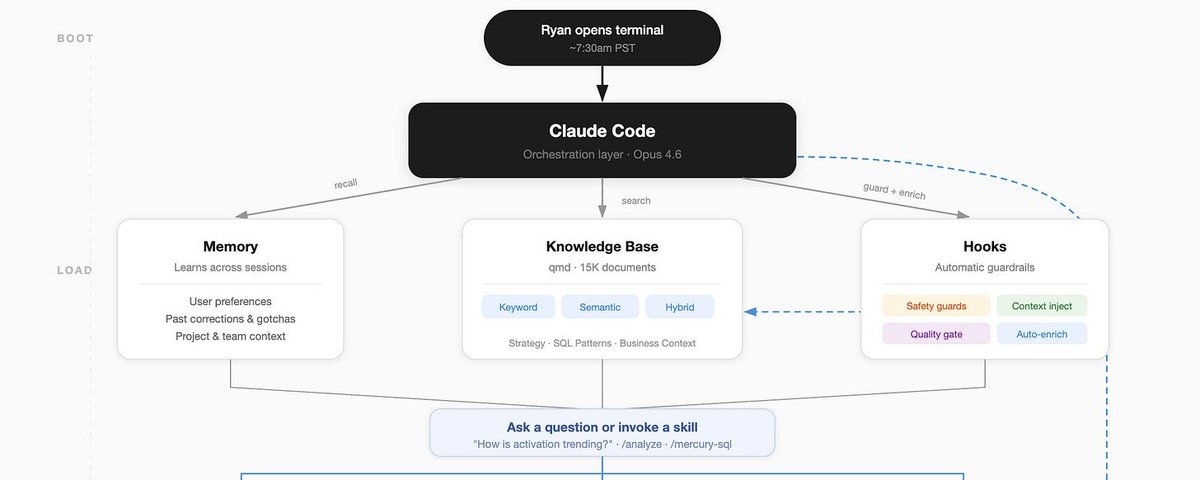
@mercury でプロダクト VP として働く私は、5年分の業務履歴、15,000件のドキュメント、350万語、そして使っているすべてのツールを統合した「セカンドブレイン」を作ることで、生産性を2倍にしました。これはローカルで動作し、LLM を使うたびの中心的な存在となり、日々改善され続けています。
今日は、そのスタック、ワークフロー、構築するためのプロンプトを共有します。
## 背景
私は @mercury のプロダクト VP で、つまり大量のミーティングに参加し、様々なツール(Linear、Slack、Notion、データ分析)を通じて大量のコンテンツを消費し、実際に物事を成し遂げることに注力しています。この会社で5年間働き、情報中毒者として、私は Mercury の 2021年〜現在についての歩く百科事典のような存在です——でも最近、自分のスコープ+作業量のせいで、すべてのプレートを回し続けることができなくなってきました。
ある日 X をスクロールしていると、@tobi の QMD から始まる一連の投稿が目に入りました。QMD はローカルのベクター検索で、それからいくつかの投稿が表れて、私にとってのドットをつなぎ始めました:
- Claude Code がフック(イベントごとのプロンプトインジェクション)を立ち上げた
- GasTown / OpenClaw がメモリを書き込み、サブエージェントに委任するオーケストレーターのパワーで立ち上がった
- MCP/CLI が臨界量に達し、管理者に API キーを求めなくても中核ツールの多くが利用可能になった
- @tylercowen がインタビューで「AIのために書く」について広範に語り、心に響いた——すでに存在しながら使っていない業務アウトプットがどれほどあるのか?
構築するときが来たと判断しました。
## 準備作業(合計1〜2時間)
始めるにあたり、知ることができるすべてのコンテンツのライブラリが必要でした……だから Mercury での仕事で作ったすべてのドキュメント+関連する製品戦略、分析、レトロ、実行に関する振り返りをダウンロードしました。その結果、15,000以上のドキュメント、350万語になりました。全部読んだかもしれませんが、ほとんど忘れています。これらを「raw data」と呼ぶフォルダに入れ、QMD を実行してコンピューター上でインデックスしました。
うまくいくか確認するために、Claude Code を使ってランダムな記憶についてや、このナレッジベースからの驚くべきインサイトを質問しました——テキストベースの検索よりもベクター検索がはるかに高性能であることを確認したとき、続ける自信がつきました。お気に入りの本の推薦を1つ質問したら、不気味なほど正確な推薦をしてくれました。この旅での最良のアドバイスを伝えます:各ステップをテストしながら進むこと!局所最大値に登り続けてしまいやすいですから。
## ブレインをトレーニングしてツールに接続する(約2時間)
すべての生データを手に、それが自分自身+自分の目標+使用するツールを理解できるようにする必要がありました。3つのアプローチを取りました:
**自分自身を説明する** — セカンドブレインを作るためには、自分の思考を理解させる必要がありました。me.md を書き、自分が誰か(仕事+生活)、目標+過去5年の業績評価+個人の優先事項を与えました。最も謙虚だったのは、システムが自分のパフォーマンスレビューを通じて、私が何年も同じ戦略的ミスを犯し続けており、セットアップしていたその週もまさにそれをしていると指摘してきたことです。
**データを「蒸留」する** — me.md +ナレッジベースを使って、私と生のナレッジベースの間のドキュメント群を作るエージェントチームを立ち上げました。このアイデアは主に、LLM がタスクをこなすためにより小さなモデルを蒸留するという考えから来たものです。Agent Teams がリリースされたばかりで、ナレッジから取り組んできた主要な「テーマ」を見つけ、それらの出典付き歴史を提供し、主要な教訓をサマリーするスウォームを使いました。これらが context.md フォルダを作りました。
**ツール** — 私はいくつかのツール(Google Docs、Linear、Notion、Metabase)を使っており、幸いほとんどに Claude Code のコネクターがあるか、これらの企業が MCP/CLI を積極的に立ち上げています。いくつかにはなかったですが、「XYZのクエリを実行する」などのタスクを完了できるよう、直接 API コールを作成する特定のスキルを立ち上げました。
Claude は私に関するすべての情報+使うツール+膨大な作業ライブラリへのアクセスを持っていましたが、本当に何かを知っているのでしょうか?誰かが知っているのでしょうか?
## 接続する(1時間未満)
この時点で、使うか諦めるかを決める言葉と文書が非常に多くありました。でも毎回検索しなければならないのは嫌でした——そこで「フック」が目に入りました。
Claude Code のフックは、(セッション開始時、ツール使用後、セッション終了時など)プロンプトに内容を注入できます。UserPromptSubmit フックを使って、Claude Code が qmd を使ってプロンプトに関連する名前+トピック+特定のドキュメントを見つけるようにしました。
これはオタクが興奮する瞬間ですが、Finder でファイルを検索するとき、ほとんどが名前+生テキスト検索です……でも QMD はコンテキストを検索に取り込めます。私のシステムはクエリを考え出し、2つのテクニックのうちの1つで結果を返します:
- **vsearch(セマンティック/ベクター)** — 私の質問の意味を理解する。「ファネルのパフォーマンスは?」は「ファネル」と書かれていなくてもコンバージョン率に関するドキュメントを見つける。
- **BM25(キーワード)** — 完全一致検索。セマンティック検索が見落とすかもしれない固有名詞、頭字語、特定のメトリクスをキャッチする。
プロンプトにコンテキストを注入し始めると、結果の品質が向上するのをすぐに感じました。ずぼらな専門用語と限られたコンテキストを与えて、Claude が「セカンドブレイン」コンテンツでそれを豊かにしてくれるのを見て、適切なコンテキスト+ツールがすべてのクエリに入ることのパワーを実感しました。そして奇妙なことが起き始めました……でもあと1ステップあったので、その話は後に。
## 学習させる
GasTown と OpenClaw のエージェントはメモリ(書き込まれた .md)ファイルを継続的に更新するから改善されているように見えました。だから私も同じように学べるかと考え始めました。自己反省、新しい知識の増分追加のための本質的に3つのフレームがあると分かりました:
**セッションごと** — /learn スキルを作り、会話を取り上げ、完了しようとしていたタスクを見て、.md ファイルを更新します。これは定期的にエラーを起こす MCP に特に役立ちました——一度経験すると、プロンプトが改善されて同じエラーが避けられます。
**日ごと/週ごと** — 朝のクロンジョブを使って、その日に来るものの毎日のブリーフ+ナレッジベースからの関連コンテキストを立ち上げ、これらを使って進行中のことのメモリを自動的に更新します。
**月末** — 月末に、Claude Code と世界の状況についてインタビューします。今月何をしようとしていたか、実際にどうなったか、何がうまくいってうまくいかなかったか、来月何をすべきかから始めます。
## 実際にどんな感じか
ブレインや、その二番目のものの使い方を説明するのは不思議な体験ですが、生産性全体で2倍になったと本当に信じており、いくつかの実例を共有したいと思います。
**秒単位での想起速度** — 記憶の干し草の山から針を見つけるのがずっと良くなりました。私の日(とほとんどの作業タスク)は Claude Code セッションで始まり、文書を書く、分析をする、質問に答えるなどのタスクがより速くより包括的になりました。
**ミーティング準備なし** — 私の日は、自分の周りで起きていることのサマリー(ミーティング、Linear の更新、応答していない Slack メッセージ)で始まります。作業、計画、1対1のメモなどすべてのコンテキストが1箇所にあるため、1対1に入るとき、1〜2回のプロンプトで次のミーティングのどんなトピックにも準備できています。
**アクションアイテムを見逃さない** — これはおそらくこのシステムの深い使用から生まれたものですが、1日の終わりに「今日忘れたことはある?」と尋ねると、閉め忘れた1〜2つのやり取りを定期的に見つけてくれます。クロスツール統合が非常にパワフルです。
**リアルタイムフィードバック** — 私は約15年働いており、マネージャーから最も頻繁に受けるフィードバックは2週間ごとか毎週が最善です。これは私の業績評価を持っており、マネージャーから受けているフィードバックを知っており、以前フィードバックされたのと同じパターンをしていると指摘してくれます。
---
## 使えるプロンプト
```
「セカンドブレイン」、つまり Claude Code を使って並行して動く永続的な知識システムを構築するのを手伝ってください。5つのフェーズで行います。それぞれ対話的に案内してください。先に進まないで——次に進む前に各フェーズが機能していることを確認してください。
## フェーズ1:私へのインタビュー&プロファイル作成
以下を記録した ~/Documents/second-brain/me.md ファイルを作るために私にインタビューしてください:
- 私が誰か(役職、会社、責任)
- 何を最適化しているか(目標、優先事項、成功の形)
- 私の働き方(毎日使うツール、コミュニケーション方法、何がイライラするか)
- 私の成長の端(受けたフィードバック、破りたいパターン)
- 仕事以外で気にすること(興味、価値観——推薦に役立つ)
5〜7問を会話形式で質問してください。テンプレートを埋めさせないでください。十分な情報が得られたらファイルを書いてください。
## フェーズ2:ナレッジベースの構築
職務履歴を収集してインデックスするのを手伝ってください:
1. ドキュメントがどこにあるか(Google Docs、Notion のエクスポート、ローカルファイルなど)を聞いてください
2. ~/Documents/second-brain/raw/ にエクスポート/ダウンロードするのを手伝ってください
3. まだなければ QMD(https://github.com/tobi/qmd)をインストール:`bun install -g qmd`
4. raw フォルダから QMD コレクションを作成:`qmd collection add Documents/second-brain/raw`
5. インデックスする:`qmd update`
6. **一緒にテストする** — 取り組んだことをいくつか思い出させてもらい、KB を検索してみつかるか確認する。keyword と semantic の両方を試す。結果が悪ければ、先に進む前にトラブルシューティングする。
## フェーズ3:蒸留&サマリー
me.md +ナレッジベースを使って、~/Documents/second-brain/summaries/ を作成:
- strategic-context.md — 私の会社/チームが何を目指し、なぜそうなのか
- role-context.md — 私の具体的な責任とどう貢献しているか
- historical-context.md — 職務履歴からの主要な決定、転換点、教訓
- team-context.md — 一緒に働く人、ダイナミクス、ステークホルダー
- personal-growth.md — フィードバックのパターン、コーチングのテーマ
各ファイルについて、KB を広範に検索し(10以上のクエリを keyword と semantic 混在で)、特定のソースドキュメントを引用し、推測と引用の違いを示してください。
## フェーズ4:自動コンテキスト注入のセットアップ
毎回のプロンプトに関連する KB コンテキストを豊かにする Claude Code フックを作成。
~/.claude/hooks/context-enrichment.sh を作成:
1. プロンプトから主要な用語と名前を抽出
2. QMD コレクションに対して並行検索(semantic + keyword)を実行
3. 上位の結果をプロンプトに注入されたコンテキストとして返す
4. 2秒以内に完了(時間がかかりすぎる検索はキル)
~/.claude/settings.local.json に UserPromptSubmit フックとして登録。
フックをテストする:KB にあることについてぞんざいなプロンプトを入力して、フックが有用なコンテキストを注入するか確認します。
## フェーズ5:学習ループの作成
3つの学習メカニズムをセットアップ:
### セッションごと:/learn スキル
~/.claude/skills/learn/SKILL.md を作成:
- ミス、驚き、検証済みアプローチについて会話を見直す
- 新しいツールの注意点、ワークフローの好み、修正で ~/.claude/CLAUDE.md を更新
- 重要なコンテキストを ~/.claude/projects/-Users-{me}/memory/ のメモリファイルに保存
- 簡潔さを優先——本当に新しく将来のセッションに役立つものだけ保存
~/.claude/scripts/morning-brief.sh にスクリプトを作成:
- カレンダーを確認(Google CLI がある場合)
- 今日のミーティングに関連するコンテキストを KB から検索
- 接続ツールからの更新を要約
- 2分で読める短いブリーフを出力
好みの朝の時間に実行する launchd ジョブとしてセットアップするのを手伝ってください。
### 月ごと:レトロプロンプト
~/.claude/skills/retro/SKILL.md を作成:
- 今月何を達成しようとしていたか?
- 実際にどうなったか?
- どんなパターンが現れているか(良いものも悪いものも)?
- 来月は何を変えるべきか?
- 変化したことがあれば summaries/ を更新。
---
## このプロセス全体のルール:
- 何かをインストールする前に確認を取る
- 次に進む前に各フェーズをテストする
- 何かが失敗したら再試行しない——2つの代替案を提示する
- すべてのファイルは ~/Documents/second-brain/(KB)または ~/.claude/(設定)に入れる
- 過度なエンジニアリングをしない——クラスよりも関数、フレームワークよりもスクリプト
- すべては後で私が実行、デバッグ、変更できるものにする
フェーズ1から始めてください。私にインタビューしてください。
```
## 行動への呼びかけ
これを共有する主な理由は、同様のシステムにインスパイアされてきたからです。そしてこれをさらに良くしたいと思っています——もし使ったら、何がうまくいきましたか?うまくいかなかったことは?引っ張るべき他のスレッドはありますか?
claude-setupharness-designagent-ops
Claude Codeでセカンドブレインを構築する
22112
原文を表示 / Show original
I've 2x’d my productivity as a VP of Product @mercury by creating a "Second Brain" using 5 years of work history, 15k docs with 3.5 million words, and every tool in my stack. It runs locally, is a core part of my every use of LLM, and gets better everyday.
Today, I want to share the stack, the workflow, and the prompt to build it:
Background
I am a VP of Product for @mercury, which is a long way of saying I'm in a lot of meetings, consuming a lot of content across different tools (linear, slack, notion, data analyses), and trying to make sure I actually get stuff done. Working at a company for 5 years and being an information addict, I am essentially a walking encyclopedia for Mercury post 2021-today -- but I've recently found that my scope + workload means I can't keep every plate spinning.
One day, I was scrolling X and came across a series of posts that caught my attention, starting with @tobi's QMD. QMD is a local vector search, and then a few other posts started to show up that connected a few dots for me:
Claude Code launched hooks (per-event prompt injections)
GasTown / OpenClaw launched with the power of orchestrators writing memory + delegating to sub-agents (among many other patterns)
MCPs/CLIs hit a critical mass, and enough of my core tools were available without having to ask admins to give me API keys
@tylercowen did an interview and talked extensively about "writing for AI" in a way that struck a chord - how much output of work already exists that I'm not using?
I decided that it was time to build
Prep work (~1-2 hours end to end)
To start, I needed a library of all the content I could know about... so I downloaded every document I've ever created for my job at Mercury + any relevant product strategy, analysis, retro, reflection on execution, etc. This netted out to over 15k documents and 3.5 million words. Maybe I've read them all, but I've forgotten most. These became a folder that I just called "raw data", and I ran QMD to index this on my computer.
To see if this worked, I used Claude Code to ask about random memories and surprising insights from this knowledge base - the amount of delight/surprise I experienced in seeing how much more capable vector search was than text-based search gave me the confidence to keep going. I asked one questions about books that it would think I like, and it was spooky how good of recommendations it gave me. I think this is my best advice in this journey: test every step of the way! Easy to get caught in hill climbing a local maxima
Train my brain and connect it to my tools (~2 hours)
With all the raw data, I needed to help it make sense of me + what my goals are + the tools I used, so pursued three paths:
Explain myself - to be able to create a second brain, it needed to know what mine was doing. I wrote up a me.md explaining who I am (work + life), gave it my goals + performance reviews for the last 5 years + set of personal priorities. The most humbling part was the system pointing out that I've been making the same strategic mistake for years, according to my own performance reviews, and was making it that week as I was setting up the system
"Distill" the data - I spun up an agent team to use the me.md + the knowledge base to create a set of docs between me <> raw knowledge base. This idea largely came from the idea that LLMs regularly distill down smaller models to take tasks, and I had no idea if it would help me in this, but Agent Teams had just launched and so I had a swarm of them find the main "themes" we've worked on from the knowledge, give sourced histories of this, and summarize key lessons. These created a context.md folder
Tools - I use a few tools (Google Docs, Linear, Notion, Metabase) , and luckily most have connectors on Claude Code or these companies are actively launching MCPs/CLIs. A few didn't, but I spun up specific skills that crafted direct API calls to be able to complete tasks like "run a query for XYZ".
Claude had access to all the information about me + the tools I used + had a massive library of all my work, but did it really know anything? Does anyone?
Wire it up (<1 hour)
At this point, I had so many words + documents that it was time to actually find use or abandon ship. But I didn't want to have to go search this every time and that's when "hooks" caught my attention.
Hooks from Claude Code let you insert content into your prompt without needing to ask (or when a session starts, after a tool use, or when a session stops). Using the UserPromptSubmit hook, I enabled my Claude Code to use qmd to find names + topics + specific documents related to my prompt.
This is a nerd-out moment, but when searching for files in Finder, it is mostly a name + raw text search.... but QMD can help bring context into searches. My system is tuned to figure out a query, then returns results using one of two techniques:
vsearch (semantic/vector) — understands meaning of my question. "How's the funnel performing?" finds documents about conversion rates even if they don't say "funnel."
BM25 (keyword) — exact term matching. Catches proper nouns, acronyms, specific metrics that semantic search might miss.
Very quickly after injecting context into prompts, I saw the quality of my results improving. My ability to bring lazy jargon and limited context, then have Claude enrich it with my "Second Brain" content showed me the power of the right context + tools going into every query, and I started to have weird things happen.... but more on that in a minute, because I had one more major step to unlock
Let it learn
GasTown and OpenClaw agents seemed to get better because they are consistently updating their memory (a written .md) file, so I started to wonder if I could learn this way too. I found that there are essentially three time frames in to self-reflect, increment new knowledge, and :
Per session - I created a /learn skill that takes a conversation, looks at the task I was trying to complete, and then updates my .md files. This has been particularly useful for MCPs that regularly error out - once its been experienced once, the prompts get better to avoid the same errors.
Per day/week - I use a morning chron job to spin up a daily brief of what's coming each day for me + any relevant context from my knowledge base, and then use these to automatically update my memory of what's progressing.
End of Month - At the end of the month, I do an interview with my Claude Code on the state of the world: we start with what we were trying to do this month, how it actually went, what went great and poorly, and what we should do for next month.
What this looks like in practice
It is a strange experience to describe how you use a brain, or a second one for that matter, but I legitimately believe I've 2x'ed my productivity as a whole and I want to share some practical examples.
Recall speed of seconds - finding the needle in a haystack of my memory is now much better; my days (and most work tasks) start in a Claude Code sessions and for any task like writing a document, doing an analysis, or answering a question is now both faster and more comprehensive
No more meeting prep - my day starts with a summary of what's happening around me - meetings, linear updates, github pushes, slack messages I haven't responded to. Because all the context of the work, the plans, the notes from our 1:1s, etc are in one place, when I enter a 1:1, I am ready for any topics with 1 or 2 prompts about the upcoming meeting.
Never miss an action item - this is likely emergent from deep usage of this system, but I ask at the end of the day "is there anything I forgot to do today?" and it regularly finds the one or two interactions I forgot to close out. Cross tool synthesis is SO powerful
Realtime feedback - I've been working for ~15 years, and the most frequent feedback I've gotten from managers is bi-weekly or weekly at best. Because this has my performance reviews, it knows what feedback I'm getting from my managers and has called out me doing the same patterns I've gotten feedback on.
Here's what an actual conversation looks like:
GIF
the "hooks" really do a lot of the carrying here, but information is sensitive so can't share the raw version sadly
The proactive explorer mode
Because this system is so capable and knowledgable (+I'm so biased on my POV after 5 years in a job), I've started asking it regularly to think about the company priorities, all my knowledge and experience, and has access to all the tools I have, the Second Brain system is capable of doing autonomous research for how I can solve my problems.
At this point, it is no longer a cohesive narrative because I'm actively in this: I've started layering on other new functionality like Chron/Scheduled jobs, Agent Teams/Swarm, @karpathy's AutoResearch capabilities, @lennysan's interview archives... These flow into my daily briefs, sectioned-off parts of my memory, and become skills that are re-usable.
The Second Brain system (as drawn by itself)
A prompt you can use
plaintext
I want you to help me build a "Second Brain" — a persistent knowledge system that runs in parallel to my work using Claude Code. We'll do this in 5 phases. Walk me through each one interactively. Don't skip ahead — confirm each phase is working before moving on.
## Phase 1: Interview Me & Create my Profile
Interview me to create a file at ~/Documents/second-brain/me.md that captures:
- Who I am (role, company, responsibilities)
- What I'm optimizing for (goals, priorities, what success looks like)
- My working style (tools I use daily, how I communicate, what frustrates me)
- My growth edges (feedback I've gotten, patterns I want to break)
- What I care about outside work (interests, values — helps with recommendations)
Ask me 5-7 questions conversationally. Don't make me fill out a template. Write the file when you have enough.
## Phase 2: Build the Knowledge Base
Help me collect and index my work history:
1. Ask me where my documents live (Google Docs, Notion exports, local files, etc.)
2. Help me export/download them into ~/Documents/second-brain/raw/
3. Install QMD (https://github.com/tobi/qmd) if not present: `bun install -g qmd`
4. Create a QMD collection from the raw folder: `qmd collection add Documents/second-brain/raw`
5. Index it: `qmd update`
6. **Test it together** — ask me for a few things I remember working on, then search the KB to see if it finds them. Try both `qmd search` (keyword) and `qmd vsearch` (semantic). If results are bad, we troubleshoot before moving on.
## Phase 3: Distill & Summarize
Using me.md + the knowledge base, create ~/Documents/second-brain/summaries/ with:
- strategic-context.md — what my company/team is trying to do and why
- role-context.md — my specific responsibilities and how I fit in
- historical-context.md — key decisions, pivots, lessons from my work history
- team-context.md — who I work with, dynamics, stakeholders
- personal-growth.md — patterns in my feedback, coaching themes
For each file, search the KB extensively (10+ queries mixing keyword and semantic search), cite specific source documents, and flag where you're inferring vs. quoting.
## Phase 4: Wire Up Automatic Context Injection
Create a Claude Code hook that enriches every prompt with relevant KB context.
Create ~/.claude/hooks/context-enrichment.sh that:
1. Extracts key terms and names from my prompt
2. Runs parallel searches (semantic + keyword) against the QMD collection
3. Returns the top results as context injected into the prompt
4. Completes in <2 seconds (kill searches that take longer)
Register it in ~/.claude/settings.local.json as a UserPromptSubmit hook.
The hook should output a <context> block with search results so Claude sees it but it doesn't clutter my conversation.
Test it: I'll type a lazy prompt about something in my KB and we'll see if the hook injects useful context.
## Phase 5: Create the Learning Loop
Set up three learning mechanisms:
### Per-session: /learn skill
Create ~/.claude/skills/learn/SKILL.md that:
- Reviews the conversation for mistakes, surprises, and validated approaches
- Updates ~/.claude/CLAUDE.md with new tool gotchas, workflow preferences, corrections
- Saves important context to memory files in ~/.claude/projects/-Users-{me}/memory/
- Bias toward brevity — only save what's genuinely new and useful for future sessions
Create a script at ~/.claude/scripts/morning-brief.sh that:
- Checks my calendar (if Google CLI is available)
- Searches the KB for context related to today's meetings
- Summarizes any updates from connected tools
- Outputs a brief I can read in 2 minutes
Help me set it up as a launchd job that runs at my preferred morning time.
### Per-month: Retro prompt
Create ~/.claude/skills/retro/SKILL.md that walks me through:
- What were we trying to accomplish this month?
- How did it actually go?
- What patterns are emerging (good and bad)?
- What should change next month?
- Update summaries/ with anything that's shifted.
---
## Rules for this whole process:
- Ask before installing anything
- Test each phase before moving to the next
- If something fails, don't retry — propose 2 alternatives
- Keep all files in ~/Documents/second-brain/ (KB) or ~/.claude/ (config)
- No over-engineering — functions over classes, scripts over frameworks
- Everything should be runnable, debuggable, and modifiable by me later
Start with Phase 1. Interview me.
A call to action
The main reason I am sharing this is because I've been inspired by similar systems, and I want this one to be even better - if you use it, what worked? what didn't? any other threads I should pull here?