
記事一覧へ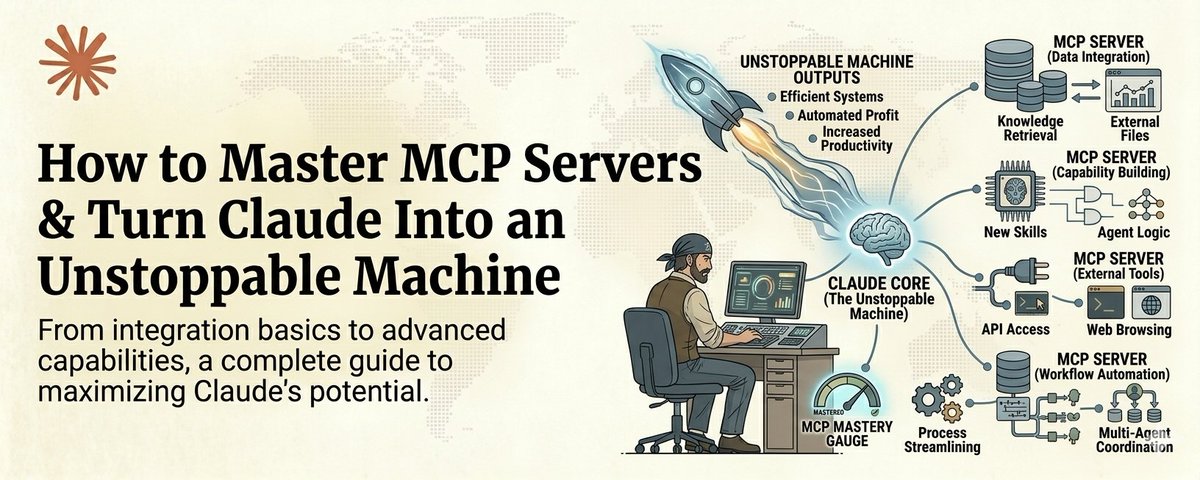
現在Claudeを使っているほとんどの人は、Claudeの手を後ろで縛った状態で使っている。
これを保存しておこう :)
みんな質問を入力し、回答を得て、どこかにコピーし、自分でデータを探し、別のツールに貼り付け、統合作業を手動でこなしている。
それはAIのレバレッジではない。補助輪付きのAIだ。
MCPサーバーこそが、その補助輪を外すものだ。
MCPとはModel Context Protocolの略で、Claudeが現実世界にリーチして対話できるようにするシステムだ。Google Driveを読む。リアルタイムデータでウェブを検索する。Slackのメッセージを取得する。データベースをクエリする。CRMにアクセスする。GitHubと連携する。
MCPなしのClaudeは、瓶の中の脳みそだ。驚異的に賢いが、完全に孤立している。
MCPありのClaudeはオペレーターになる。あなたの仕事を考えるだけでなく、実際に仕事をこなす。
そして今、Claudeユーザーの5%未満しかMCPサーバーを一つも設定していない。
一午後を使って動作原理を学ぶ気のある人にとって、これはとてつもない競争優位性だ。
ここにフルコースを用意した。
## MCPが実際に何なのか(60秒バージョン)
MCPサーバーをClaudeにスーパーパワーを与えるプラグインだと思えばいい。
各MCPサーバーはClaudeを一つの外部システムに接続する。Google Drive用に一つ。ウェブ検索用に一つ。データベース用に一つ。Slack用に一つ。GitHub用に一つ。
接続されると、Claudeはそれらのシステムを直接読み書きできる。コピペなし。タブ切り替えなし。手動のデータ転送なし。
「Driveの中からQ3レポートを見つけて、売上数字を取ってきて、オンラインの業界ベンチマークと比較して、チームへのサマリーをSlackで下書きして」とClaudeに伝える。
MCPなしだと、それは4つの異なるアプリにまたがる5つの別々のタスクで、おそらく30分かかる。
MCPありだと、Claudeがすべてをこなす。秒単位で。
これが違いだ。そして、それは甚大だ。
## パート1:誰もが最初にインストールすべき5つのMCPサーバー
50個のMCPサーバーは必要ない。正しい5個が必要だ。これらは実際の仕事の90%をカバーするものだ。
### 1. Tavily — リアルタイムウェブ検索
これはClaudeを現在の情報に対して本当に使えるものにするサーバーだ。
Tavilyなしでは、Claudeの知識には締切日がある。Tavilyありでは、ライブウェブを検索し、あらゆるページからクリーンな構造化データを抽出し、リアルタイム情報を会話に直接取り込める。
Googleのような青いリンクではない。クリーンで構造化されたAI対応データだ。
ユースケース:市場調査、競合分析、現在の価格確認、最新ニュースの確認、コンテンツ公開前のファクトチェック。
セットアップは5分未満。APIキーが一つ。設定ファイルに一行追加。完了。
### 2. Google Drive — ファイルへのアクセス
これはClaudeをあなたの仕事について外から推測する部外者から、すべてのドキュメントを読んだチームメンバーに変える。
ClaudeはDriveを検索し、ドキュメントを読み、スプレッドシートからデータを取得し、新しい作業を生成する際に既存ファイルを参照できる。ファイルを一つずつアップロードする代わりに、Claudeが直接アクセスするだけだ。
### 3. Context7 — 常に最新のドキュメント
少しでもコードを書くなら、これは必須だ。
Context7はあらゆるライブラリの最新ドキュメントをClaudeのコンテキストに直接注入する。ハルシネートされたAPIはもうない。廃止されたメソッドはもうない。Claudeが存在しない関数を使って書いたコードのデバッグに30分無駄にすることはもうない。
プロンプトに「use context7」と追加するだけで、ClaudeはNext.js、React、Supabase、MongoDB、その他数千のライブラリの本物の最新ドキュメントを取得する。
### 4. Slack — コミュニケーションアクセス
ClaudeはSlackチャンネルを読み、メッセージ履歴を検索し、返信を下書きできる。チームを管理したり複数のチャンネルにまたがって作業する人にとって、これは毎週節約できる時間だ。
### 5. GitHub — コードとプロジェクトへのアクセス
Claudeはリポジトリを読み、プルリクエストをレビューし、Issueを検索し、コンテキストの中でコードベースを理解する。ソフトウェアを構築しているなら、これはClaudeと実際の仕事をつなぐ橋だ。
## パート2:最初のMCPサーバーをインストールする方法(ステップバイステップ)
これは多くの人が思うより簡単だ。複雑さは人々が始めることを妨げる神話だ。
ステップ1:Claude Desktopアプリの設定を開く。設定ファイルに移動する。Macでは~/.claude/にあり、Windowsではユーザー設定ディレクトリにある。
ステップ2:MCP設定ファイルを見つけるか作成する。これはClaudeがどのサーバーに接続するかを伝えるシンプルなJSONファイルだ。
ステップ3:最初のサーバーを追加する。各MCPサーバーには接続URLと通常APIキーがある。形式は以下のようになる:
{
"mcpServers": {
"tavily": {
"type": "url",
"url": "https://mcp.tavily.com/sse",
"name": "tavily"
}
}
}
ステップ4:Claude Desktopを再起動する。サーバーは自動的に接続される。利用可能なツールのリストにそのツールが表示される。
ステップ5:テストする。Claudeにツールを使うよう頼む。Tavilyをインストールしたなら「今日の最新AIニュースをウェブで検索して」。うまくいけば、Claudeに初めてのスーパーパワーを与えたことになる。プロセス全体で約10分かかる。
## パート3:複数のMCPサーバーを連携させるワークフローの構築
ここが本当にパワフルになる部分だ。
一つのMCPサーバーは有用だ。単一のワークフロー内で複数のMCPサーバーが連携して動くのは変革的だ。
三つのMCPサーバーを連携させる実際のワークフローの例を示す:
週次競合インテリジェンス・ワークフロー:
- Tavilyがウェブで上位3社の競合他社の最新ニュース、製品アップデート、価格変更を検索する
- Google Driveが既存の競合他社追跡ドキュメントを取得する
- Claudeが新しいデータを既存データと比較し、何が変わったかを特定し、ドキュメントを更新する
- 更新された分析がDriveに戻り、月曜日のミーティングに備える
そのワークフローはかつて毎週2〜3時間かかっていた。MCPでは5分未満で実行でき、出力は人間が通常生み出すものより徹底している。
パターンは常に同じだ:
1. 外部世界からデータを取得する(Tavily、ウェブソース)
2. 既存の作業からコンテキストを取得する(Google Drive、GitHub)
3. 処理、分析、比較する(Claudeの脳)
4. 結果をどこか有用な場所に出力する(Drive、Slack、ファイル)
このパターンが見えたら、あらゆる場所でMCPワークフローが見えてくる。コンテンツパイプライン。セールスリサーチ。コードレビュー。レポート生成。マーケット監視。
## パート4:独自のMCPサーバーを構築する
これは上級者向けの動きだ。そして聞こえるほど複雑ではない。
既存のMCPサーバーのないツール、データベース、またはシステムがあれば、FastMCPを使って自分でサーバーを構築できる。
FastMCPを使うと、最小限のPythonでMCPサーバーを作れる。Claudeが使えるツール、入力として受け取るもの、返すものを定義する。
from fastmcp import FastMCP
mcp = FastMCP('my-custom-tool')
@mcp.tool()
def get_client_data(client_name: str) -> str:
# Your logic here
return result
それだけだ。Claudeに内部クライアントデータベースへのアクセスを与えるMCPサーバーが完成した。
## パート5:MCPマインドセットの転換
Claudeを質問するツールとして考えるのをやめよう。
Claudeをシステムへのアクセスが必要なオペレーターとして考え始めよう。
あるアプリから別のアプリに手動でデータをコピーしている時は常に、それは欠けているMCP接続だ。Claudeがファイルシステムにアクセスできないからファイルをアップロードしている時は常に、それは欠けているMCP接続だ。
目標はClaudeとの間のゼロの手動データ転送だ。
Claudeがあなたが見えるものすべてを見て、あなたが届くものすべてに届けるとき、あなたは仲介者でなくなり、ディレクターになる。あなたが指示を出す。Claudeが実行する。すべてのツールで。並行して。秒単位で。
それがMCPサーバーをマスターすることの実際の意味だ。
## 今すぐどこから始めるか
まだMCPサーバーを一つもインストールしていないなら、今日Tavilyをインストールしよう。5分かかり、Claudeがライブウェブを検索できることの即時的な見返りは、残りを追求する価値があると確信させるのに十分だ。
すでに一、二台のサーバーを動かしているなら、今週最初のマルチサーバーワークフローを構築しよう。複数のツールに触れる実際のタスクを選んで、連携させよう。
すでにMCPに慣れているなら、特定のニッチにカスタムサーバーを構築しよう。本当の競争優位性はそこにある。
今後6ヶ月でMCPサーバーをマスターした人は、他の全員には魔法のように見えるレベルで活動するだろう。技術が魔法だからではない。多くの人がまだタブ間でコピペしているからだ。
Claudeをデジタルワールドのすべてにつないだ人は、再び孤立した状態で作業することはない。
@eng_khairallah1 をフォローして、さらなるツール、ワークフロー、システムを受け取ろう。虚飾なし。効果があるものだけ。
claude-setupharness-designagent-ops
MCPサーバー完全ガイド
29140
原文を表示 / Show original
Most people using Claude right now are using it with its hands tied behind its back.
Save this :)
They type a question. They get an answer. They copy it somewhere. They go find the data themselves. They paste it into another tool. They do the integration work manually.
That is not AI leverage. That is AI with training wheels.
MCP servers are what take the training wheels off.
MCP stands for Model Context Protocol. It is the system that lets Claude reach out and interact with the real world. Read your Google Drive. Search the web with real-time data. Pull from your Slack messages. Query your databases. Access your CRM. Interact with GitHub.
Without MCP, Claude is a brain in a jar. Incredibly intelligent but completely isolated.
With MCP, Claude becomes an operator. It does not just think about your work. It does your work.
And right now, less than 5% of Claude users have set up a single MCP server.
That is an insane competitive advantage sitting right there for anyone willing to spend an afternoon learning how it works.
Here is the full course.
What MCP Actually Is (The 60-Second Version)
Think of MCP servers as plugins that give Claude superpowers.
Each MCP server connects Claude to one external system. One server for Google Drive. One for web search. One for your database. One for Slack. One for GitHub.
Once connected, Claude can read from and write to those systems directly. No copy-pasting. No tab switching. No manual data transfer.
You tell Claude "find the Q3 report in my Drive, pull the revenue numbers, compare them to the industry benchmarks online, and draft a summary for my team in Slack."
Without MCP, that is 5 separate tasks across 4 different apps and probably 30 minutes of your time.
With MCP, Claude does all of it. In seconds.
That is the difference. And it is massive.
Part 1: The 5 MCP Servers Everyone Should Install First
You do not need 50 MCP servers. You need the right 5. These are the ones that cover 90% of real work.
1. Tavily — Real-Time Web Search
This is the one that makes Claude actually useful for current information.
Without Tavily, Claude's knowledge has a cutoff date. With Tavily, it can search the live web, extract clean structured data from any page, and bring real-time information directly into your conversation.
Not blue links like Google. Clean, structured, AI-ready data.
Use cases: market research, competitive analysis, finding current pricing, checking recent news, verifying facts before publishing content.
Setup takes under 5 minutes. One API key. One config file entry. Done.
2. Google Drive — Your Files, Accessible
This turns Claude from an outsider guessing about your work into a team member who has read all the docs.
Claude can search your Drive, read documents, pull data from spreadsheets, and reference your existing files when generating new work.
Instead of uploading files one at a time, Claude just accesses them directly.
3. Context7 — Always Up-To-Date Documentation
If you write any code at all, this one is non-negotiable.
Context7 injects the latest documentation for any library directly into Claude's context. No more hallucinated APIs. No more deprecated methods. No more wasting 30 minutes debugging code that Claude wrote using a function that does not exist anymore.
Just add "use context7" to your prompt and Claude gets the real, current docs for Next.js, React, Supabase, MongoDB, and thousands more.
4. Slack — Communication Access
Claude can read your Slack channels, search message history, and draft responses. For anyone managing a team or working across multiple channels, this is hours saved every week.
5. GitHub — Code and Project Access
Claude reads repos, reviews pull requests, searches issues, and understands your codebase in context. If you are building software, this is the bridge between Claude and your actual work.
Part 2: How to Install Your First MCP Server (Step by Step)
This is simpler than most people think. The complexity is a myth that keeps people from starting.
Step 1: Open your Claude Desktop app settings
Navigate to your config file. On Mac it lives at ~/.claude/ and on Windows in your user config directory.
Step 2: Find or create your MCP configuration file
This is a simple JSON file that tells Claude which servers to connect to.
Step 3: Add your first server
Each MCP server has a connection URL and usually an API key. The format looks like this:
json
{
"mcpServers": {
"tavily": {
"type": "url",
"url": "<https://mcp.tavily.com/sse>",
"name": "tavily"
}
}
}
Step 4: Restart Claude Desktop
The server connects automatically. You will see the tools appear in your available tools list.
Step 5: Test it
Ask Claude to use the tool. "Search the web for the latest AI news today" if you installed Tavily. "Find my Q3 report" if you installed Google Drive.
If it works, you just gave Claude its first superpower. The whole process takes about 10 minutes.
Part 3: Building Workflows That Chain Multiple MCP Servers Together
This is where it gets genuinely powerful.
One MCP server is useful. Multiple MCP servers working together in a single workflow is transformative.
Here is an example of a real workflow that chains three MCP servers:
The Weekly Competitive Intelligence Workflow
Tavily searches the web for your top 3 competitors' latest news, product updates, and pricing changes
Google Drive pulls your existing competitor tracking document
Claude compares the new data against your existing data, identifies what changed, and updates the document
The updated analysis lands back in your Drive, ready for your Monday meeting
That workflow used to take someone 2 to 3 hours every week. With MCP it runs in under 5 minutes and the output is more thorough than what a human typically produces because Claude does not get bored, does not skip sources, and does not forget to check last week's data.
The pattern is always the same:
Pull data from the outside world (Tavily, web sources)
Pull context from your existing work (Google Drive, GitHub)
Process, analyze, and compare (Claude's brain)
Output the result somewhere useful (Drive, Slack, a file)
Once you see this pattern, you start seeing MCP workflows everywhere. Content pipelines. Sales research. Code review. Report generation. Market monitoring.
Part 4: Building Your Own MCP Server
This is the advanced move. And it is simpler than it sounds.
If you have a tool, a database, or a system that does not have an existing MCP server, you can build one yourself using FastMCP.
FastMCP lets you create an MCP server in minimal Python. You define the tools Claude can use, what inputs they take, and what they return.
Here is what a basic custom MCP server looks like:
python
from fastmcp import FastMCP
mcp = FastMCP("my-custom-tool")
@mcp.tool()
def get_client_data(client_name: str) -> str:
"""Pull client data from our internal database"""
# Your logic here
return result
That is it. You now have an MCP server that gives Claude access to your internal client database.
The builders who are creating custom MCP servers for their specific workflows right now are building moats that will be extremely hard to replicate later. Because the server itself is simple. The domain knowledge baked into it is what makes it valuable.
Part 5: The MCP Mindset Shift
Here is the mental model that changes everything.
Stop thinking about Claude as a tool you ask questions to.
Start thinking about Claude as an operator that needs access to systems.
Every time you find yourself manually copying data from one app to another, that is a missing MCP connection. Every time you upload a file to Claude because it cannot access your file system, that is a missing MCP connection. Every time you type context that already exists somewhere in your digital life, that is a missing MCP connection.
The goal is zero manual data transfer between you and Claude.
When Claude can see everything you can see and reach everything you can reach, you stop being a middleman and start being a director. You give the instruction. Claude does the execution. Across all your tools. In parallel. In seconds.
That is what mastering MCP servers actually means.
Where to Start Right Now
If you have not installed a single MCP server yet, install Tavily today. It takes 5 minutes and the immediate payoff of having Claude search the live web is enough to convince you the rest is worth pursuing.
If you already have one or two servers running, build your first multi-server workflow this week. Pick a real task that touches multiple tools and chain them together.
If you are already comfortable with MCP, build a custom server for your specific niche. That is where the real competitive advantage lives.
The people who master MCP servers in the next 6 months are going to operate at a level that looks like magic to everyone else.
Not because the technology is magic. But because most people will still be copy-pasting between tabs.
Don't be that person.
The ones who connect Claude to their entire digital world will never go back to working in isolation.
Follow me @eng_khairallah1 for more tools, workflows, and systems. No fluff. Just what works.
hope this was useful for you, Khairallah ❤️