
記事一覧へ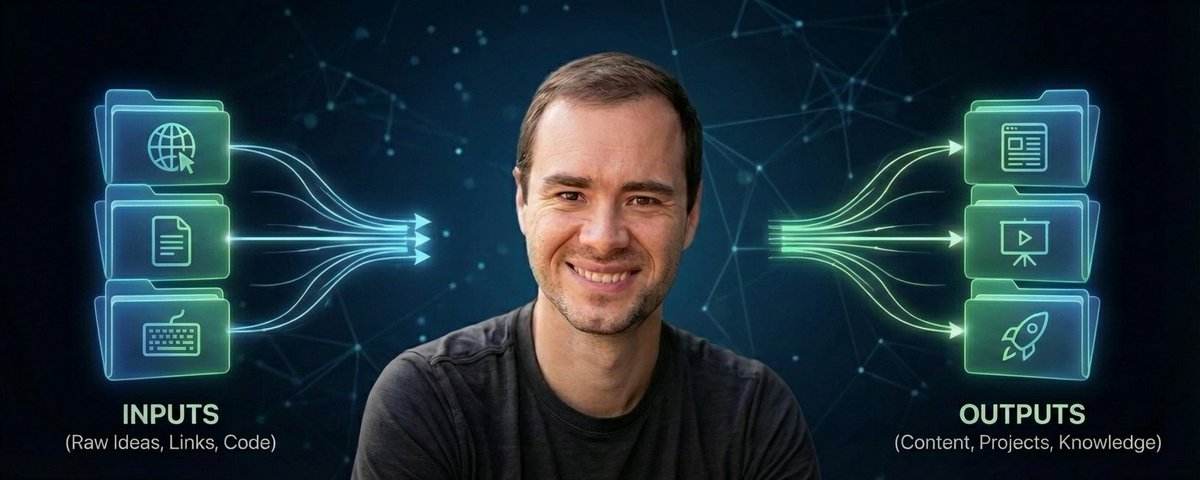
Karpathyが先週、AIを使ったパーソナル知識ベース構築に関する投稿をした。4万1千人がブックマークした。しかし、そのほとんどは実際には作らないだろう。
あなたが作るべき理由と、今週末に具体的にどう作るかを解説する。
PS: このシステムを自動構築してくれるスキルが欲しい方は、無料の「LLM Knowledge Base」スキルをどうぞ。
---
なぜほとんどのビジネスオーナーは使われていない知識の金脈の上に座っているのか
競争優位を築くために必要なものはすでに持っている。それはブックマーク、メモアプリ、忘れかけたスクリーンショット、保存したまま再度読んでいない記事、6ヶ月前の会議メモの中に眠っている。
問題は情報収集ではない。それはすでにやっている。問題は、必要なときに何も見つけられないことだ。
パーソナル知識ベースはこれを永続的に解決する。すべてをひとつの場所に放り込み、AIに向けると、そのAIが混沌を整理して、使うたびに賢くなる検索可能なWikiに変えてくれる。特別なソフトウェアも、データベースも不要。フォルダとテキストファイルだけでいい。
セットアップ(5分でできる)
コンピューター上の好きな場所にプロジェクトフォルダを作り、その中に3つのサブフォルダを作る。
raw/ — ごちゃ混ぜの引き出し。記事、メモ、スクリーンショット、会議の書き起こし、ブックマーク、リサーチ。何でも入れる。整理しなくていい。それはAIの仕事だ。
wiki/ — AIが整理した内容を書く場所。要約、アイデア間のつながり、トピックページ。手動では絶対に編集しない。
outputs/ — 知識ベースに対して質問したときにAIが生成した回答、レポート、リサーチ。
これがアーキテクチャの全て。3つのフォルダだけ。
すべてを機能させる1つのファイル
プロジェクトのルートに CLAUDE.md(またはAGENTS.md、名前は何でも構わない)というファイルを作る。これがスキーマファイルだ。知識ベースが何についてのものか、どう整理するかをAIに伝える。
スターターテンプレート:
# Knowledge Base Schema
## What This Is
A personal knowledge base about [YOUR TOPIC].
## How It s Organized
- raw/ contains unprocessed source material. Never modify these files.
- wiki/ contains the organized wiki. AI maintains this entirely.
- outputs/ contains generated reports, answers, and analyses.
## Wiki Rules
- Every topic gets its own .md file in wiki/
- Every wiki file starts with a one-paragraph summary
- Link related topics using [[topic-name]] format
- Maintain an INDEX.md that lists every topic
- When new raw sources are added, update the relevant wiki articles
## My Interests
[List 3-5 things you want this knowledge base to focus on]
このファイルは、新入社員の初日に渡すトレーニングマニュアルのようなものだ。これがないと、AIは何が重要かを推測するだけになる。あれば、すべての出力がまさに望む通りの形になる。
rawフォルダを埋める(10分)
ここで人はつまずく。フォルダを作って、空のディレクトリを眺めて止まってしまう。答えは:何でも放り込む。記事をコピー&ペーストして .md や .txt ファイルにする。使っているアプリからメモをエクスポートする。スクリーンショットを保存する。会議メモ、リサーチ、プロジェクト資料を貼り付ける。名前を変えなくていい。整理しなくていい。
私はコンテンツパイプラインだけで15以上のrawソースファイルを持っている。クリップした記事、競合分析、アナリティクスレポート。どれも手動では整理していない。
AIにWikiを作らせる
Claude Code、Cursor、またはファイルを読めるAIツールを開く。プロジェクトフォルダを指定して、こう言う:「raw/の中のすべてを読んで。CLAUDE.mdのルールに従ってwiki/にWikiをまとめて。まずINDEX.mdを作り、次に主要トピックごとに1つの.mdファイルを作って。関連トピックをリンクして。すべてのソースを要約して。」あとは待つだけ。
完了したら、wikiフォルダには整理された記事がいっぱいになっている。気づいていなかったつながり、忘れていた保存内容の要約、そして数秒ですべてを検索できるインデックスが出来上がる。
複利ループ
ここでシステムが真価を発揮する。wikiに10以上の記事が溜まったら、こんな質問をしよう:「wiki/の全てに基づいて、[トピック]に関する私の理解の最大のギャップ3つは何か?」「ソースAと[概念]について言っていることとソースBを比較して。どこで意見が食い違っているか?」「この知識ベースにあるものだけを使って、[トピック]に関する500文字のブリーフィングを書いて。」回答を知識ベースに保存する。質問するたびに次の回答が良くなる。これがループだ。
月次ヘルスチェック(必須)
月に一度、AIにこう指示する:「wiki/ディレクトリ全体をレビューして。記事間の矛盾を見つけて。言及されているが説明されていないトピックを探して。raw/のソースに裏付けられていない主張をリストアップして。ギャップを埋めるための新しい記事を3つ提案して。」これでエラーが複合する前に発見できる。ヘルスチェックは品質管理だ。
Obsidianは必要ない
インターネットの半分がこのためにObsidianプラグインを売り込んでいる。必要ない。.mdファイルのフォルダと良いスキーマファイルは、90%の確率でファンシーなツールスタックを上回る。ノートアプリの設定に、実際に知識ベースを構築するより多くの時間を費やしている人を何人も見てきた。完璧なツールを探すのをやめよう。構築を始めよう。
3つのフォルダ。1つのスキーマファイル。全てを管理するAI。これがシステムの全てだ。トピックを決めよう。フォルダを作ろう。すでに持っているものを放り込もう。残りはAIに任せよう。
PS: このシステムを自動構築してくれるスキルが欲しい方は、無料の「LLM Knowledge Base」スキルをどうぞ。
Karpathyai-thinkingナレッジ管理claude-setupAIautoresearch
Karpathyのセカンドブレインを完全解説 — コード不要で構築する方法
1,342141
原文を表示 / Show original
Karpathy dropped a post last week about building a personal knowledge base with AI. 41K people bookmarked it.
But most of them will never actually build one.
Here's why you should, and exactly how to do it this weekend.
PS: Want the skill that builds this system for you?
Grab the free LLM Knowledge Base skill.
-------------------------------------
Why Most Business Owners Are Sitting on a Gold Mine of Unused Knowledge
You already have everything you need to build a competitive advantage.
It's sitting in your bookmarks, your notes app, screenshots you forgot about, articles you saved and never re-read, meeting notes from six months ago.
The problem isn't collecting information. You're already doing that. The problem is you can't find any of it when you need it.
A personal knowledge base fixes this permanently. You dump everything into one place, point an AI at it, and it organizes the mess into a searchable wiki that gets smarter every time you use it.
No special software. No database. Just folders and text files.
The Setup (Takes 5 Minutes)
Create a project folder anywhere on your computer. Inside it, make three subfolders:
raw/ - Your junk drawer. Articles, notes, screenshots, meeting transcripts, bookmarks, research. Everything goes here. Don't organize it. That's the AI's job.
wiki/ - Where the AI writes the organized version. Summaries, connections between ideas, topic pages. You never edit this by hand.
outputs/ - Answers, reports, and research the AI generates when you ask questions against your knowledge base.
That's the entire architecture. Three folders.
The One File That Makes Everything Work
Create a file in the root of your project called CLAUDE.md (or AGENTS.md, the name doesn't matter). This is your schema file. It tells the AI what the knowledge base is about and how to organize it.
Here's a starter template:
# Knowledge Base Schema
## What This Is
A personal knowledge base about [YOUR TOPIC].
## How It's Organized
- raw/ contains unprocessed source material. Never modify these files.
- wiki/ contains the organized wiki. AI maintains this entirely.
- outputs/ contains generated reports, answers, and analyses.
## Wiki Rules
- Every topic gets its own .md file in wiki/
- Every wiki file starts with a one-paragraph summary
- Link related topics using [[topic-name]] format
- Maintain an INDEX.md that lists every topic
- When new raw sources are added, update the relevant wiki articles
## My Interests
[List 3-5 things you want this knowledge base to focus on]
This file is the equivalent of giving a new employee a training manual on day one. Without it, the AI just guesses at what matters. With it, every output is structured exactly how you want.
Fill Your Raw Folder (10 Minutes)
This is where people stall. They create the folders and stare at an empty directory.
The answer: dump everything. Copy-paste articles into .md or .txt files. Export notes from whatever app you use. Save screenshots. Paste in meeting notes, research, project docs. Don't rename anything. Don't clean it up.
I keep 15+ raw source files across my content pipeline. Clipped articles, competitor breakdowns, analytics reports. None of it is organized by hand.
Tell the AI to Build Your Wiki
Open Claude Code, Cursor, or any AI tool that can read your files. Point it at your project folder and say:
"Read everything in raw/. Compile a wiki in wiki/ following the rules in
CLAUDE.md. Create an INDEX.md first, then one .md file per major
topic. Link related topics. Summarize every source."
Then walk away. Let it work.
When it's done, you'll have a wiki folder full of organized articles with connections you didn't see, summaries of things you forgot you saved, and an index that makes everything searchable in seconds.
The Compounding Loop
This is where the system becomes valuable. Once your wiki has 10+ articles, start asking questions:
"Based on everything in wiki/, what are the three biggest gaps in my understanding of [topic]?"
"Compare what source A says about [concept] vs source B. Where do they disagree?"
"Write me a 500-word briefing on [topic] using only what's in this knowledge base."
Save the answers back into the knowledge base. Every question makes the next answer better. That's the loop.
Monthly Health Check (Non-Negotiable)
Once a month, tell the AI:
"Review the entire wiki/ directory. Flag contradictions between articles. Find topics mentioned but never explained. List claims not backed by a source in raw/. Suggest 3 new articles to fill gaps."
This catches errors before they compound. If the AI writes something slightly wrong and you save it back, the next answer builds on that mistake. The health check is your quality control.
You Don't Need Obsidian
Half the internet is pitching Obsidian plugins for this. You don't need them. A folder of .md files and a good schema file will outperform a fancy tool stack 90% of the time.
I've watched people spend more time configuring their note-taking app than actually building their knowledge base. Stop shopping for the perfect tool. Start building.
Three folders. One schema file. An AI that maintains everything. That's the whole system.
Pick your topic. Create the folders. Drop in what you already have. Let the AI do the rest.
PS: Want the skill that builds this system for you?
Grab the free LLM Knowledge Base skill (free).
この記事から生まれた Sift プラクティス
AIFCC Sift — AI最新ニュースから厳選したプラクティス集に、この記事のエッセンスが反映されています。
- Karpathy式セカンドブレイン: AIで個人ナレッジを構築ai-thinking