
記事一覧へ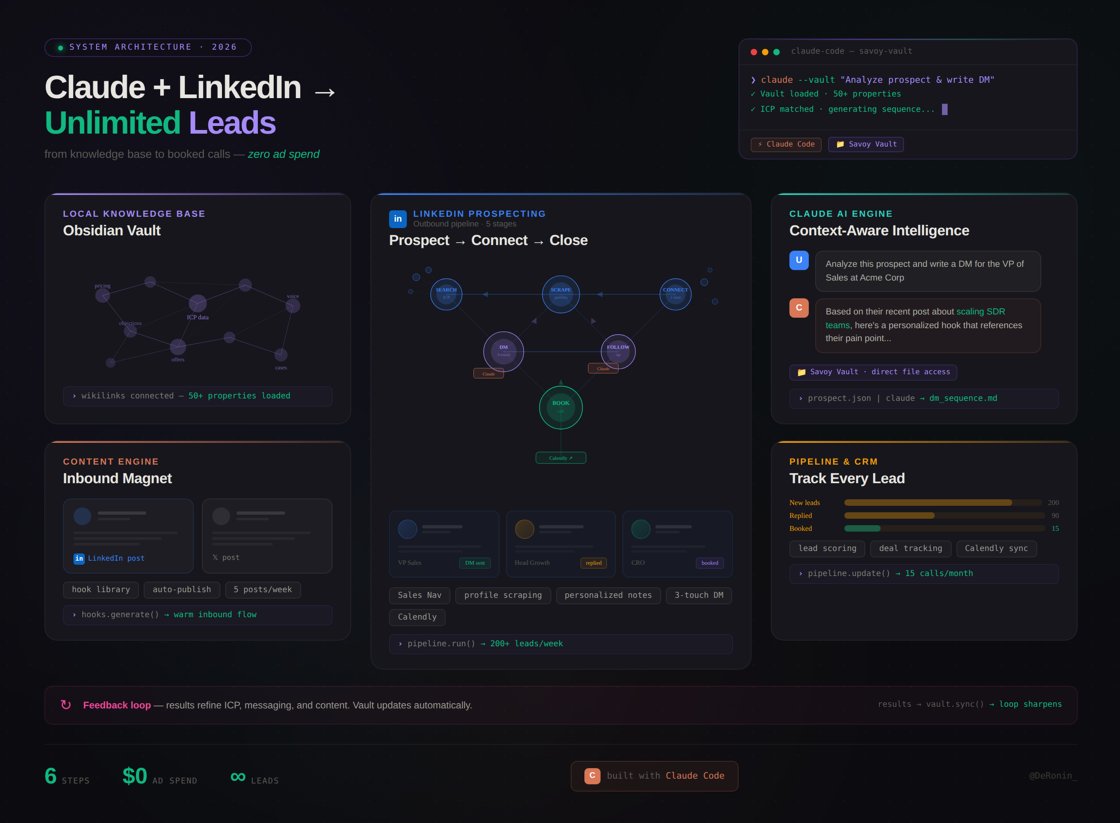
Claude + LinkedIn = 無限のリード獲得(その方法は?)
この手法で私は実際に、自分のマーケティング会社向けに1.5ヶ月で11件のクライアントを獲得しました。
現在、これを解決するために Close AI を構築中です。自分でセットアップする方法を以下にご紹介します。
LinkedIn + AI によるリード獲得の完全サイクル ↓↓↓
## 1. 土台:明確な ICP(誰をターゲットにするか)
実装方法がどうであれ、まずは自分が誰を探しているかを定義する必要があります。
これには以下の情報を含められます:
- 現在の役職
- 職務経験
- 出身大学
- 所在地
- 業界
- 特定の職務経歴
私たちは他社より安くこれらを分析できる独自の LLM を構築しており、これらのシグナルを理解してリードを収集できるように学習させています。
例:SaaS ファウンダー、従業員5〜50名、ヨーロッパ、最近営業チームを採用した企業
このようにすることで、あなたの製品を必要としている可能性が高い人たちをターゲットにできます。
## 2. リードソーシング(LinkedIn + 自動化)
LinkedIn 自体は強力なスクレイパーで、特に Sales Navigator との組み合わせで高効果ですが、私たちはこれを完全自動化しています。
ワークフロー:
1. ICP でフィルタリング
2. リストを保存
3. エクスポート(または自動化)
また、LLM のコストを削減するために収集データを最適化しています。
## 3. AI パーソナライゼーション(返信率の鍵)
アウトリーチを機能させるには、パーソナライゼーションがすべてです。コンバージョンはここで起きます。
仕組み:
1. AI がプロフィール、投稿、ペインポイントを分析する
2. 構造を構築する:パーソナルフック → コンテキスト → バリュー → ソフト CTA
例:「最近営業チームを拡大されたようですが、LinkedIn のアウトリーチなどのルーティン業務では効率が落ちることが多いですよね…」
## 4. メッセージングファネル
非常に重要です。1通のメッセージだけでは絶対にうまくいきません。
私たちのフロー:
1. 接続リクエスト(売り込みなし)
2. フォローアップ #1(価値提供)
3. フォローアップ #2(事例・インサイト)
4. フォローアップ #3(ソフト CTA)
タッチポイントが多いほど = 信頼が積み重なります。
そしてこれらすべてが学習済みの AI モデルによって処理されます。
## 5. 自動化
最初のバージョンは Claude Code を使って構築しましたが、API コストが高くなりました。
そのため今は独自の LLM + サブエージェントを構築しています。
また、LinkedIn の自動化には注意が必要です(スパムはBANにつながります)。
安全な上限:
- 1日 20〜40件の接続リクエスト
- 1日 60〜100件のメッセージ(ウォームアップ期間あり)
- ランダムな遅延 + ユニークなテンプレート = 安全なスケール拡大
## 6. このファネルを強化する方法
Claude でコンテンツワークフローを設定し、競合の投稿と自分の希望するスタイルを与えましょう。
これにより信頼が構築されます。リアルな事例のある活発なページを見た人が関心を持ちます。
最適なフォーマット:
1. 事例研究
2. インサイト
3. リアルな体験談
週に2〜3投稿でOKです。
週に約30〜60分の時間をかけるだけで、接続承認率を大幅に高めることができます。
## 7. Close AI のテスト方法
上記のすべては既に機能しており、現在ベータ段階にあります。
そしてコスト価格でのアクセスを含むホワイトリストを開放しました。
フィードバック、バグ報告、そして改善提案が必要です。そうでなければ私たちにとって価値がありません。
ホワイトリストへの申し込みはこちら:
claude-workflowagent-opsai-industry
Claudeを10倍強力にする隠しフォルダとは
39545
原文を表示 / Show original
Claude + Linkedin = Unlimited Leads (HOW?)
with this method, I literally generated 11 clients for 1.5 months for my marketing firm
now, I'm building Close AI to solve this, and here's the structure of how you can set it up by your own
Full-cycle of leads generation via LinkedIn + AI ↓↓↓
1. Foundation: clear ICP (who you're targeting)
doesn't matter how you implement it, first you need to define who you're looking for
this can include:
- current role
- experience
- university
- location
- industry
- specific work background
we're building our own LLM to analyze this cheaper than others, training it to understand these signals and collect leads
example: SaaS founders, 5-50 employees, Europe, recently hired a sales team
this way you target people who are likely to need your product
2. Lead sourcing (LinkedIn + automation)
LinkedIn itself is a powerful scraper, especially with Sales Navigator, but we fully automate it
workflow:
1. filter ICP
2. save lists
3. export (or automate)
we also optimize collected data to reduce LLM costs
3. AI personalization (key to replies)
to make outreach work, personalization is everything, this is where conversion happens
how it works:
1. AI analyzes profile, posts, and pain points
2. builds structure: personal hook → context → value → soft CTA
example: "noticed you recently expanded your sales team, but often efficiency drops on routine tasks like LinkedIn outreach…"
4. Messaging funnel
super important, it's never just one message
our flow:
1. connection request (no pitch)
2. follow-up #1 (value)
3. follow-up #2 (case/insight)
4. follow-up #3 (soft CTA)
more touchpoints = more trust
and all of this is handled by a trained AI model
5. Automation
I built the first version using Claude Code, but API costs were high
so now we're building our own LLM + sub-agents
also, be careful with LinkedIn automation (spam = ban)
safe limits:
20-40 connections/day
60-100 messages/day (with warm-up)
random delays + unique templates = safer scaling
6. How to boost this funnel
set up a content workflow in Claude, feed it competitor posts + your desired style
this builds trust, people see an active page with real case study, etc.
best formats:
1. case studies
2. insights
3. real experience
just 2-3 posts/week
takes ~30-60 min/week but significantly boosts acceptance rate
7. How to test Close AI
everything above is already working, we're now in beta
and opened a whitelist with cost-price access
we need feedback, bugs, and suggestions, otherwise it's not valuable for us
apply for whitelist access:
この記事から生まれた Sift プラクティス
AIFCC Sift — AI最新ニュースから厳選したプラクティス集に、この記事のエッセンスが反映されています。
- Claude + LinkedIn リード獲得ファネルmarketing